
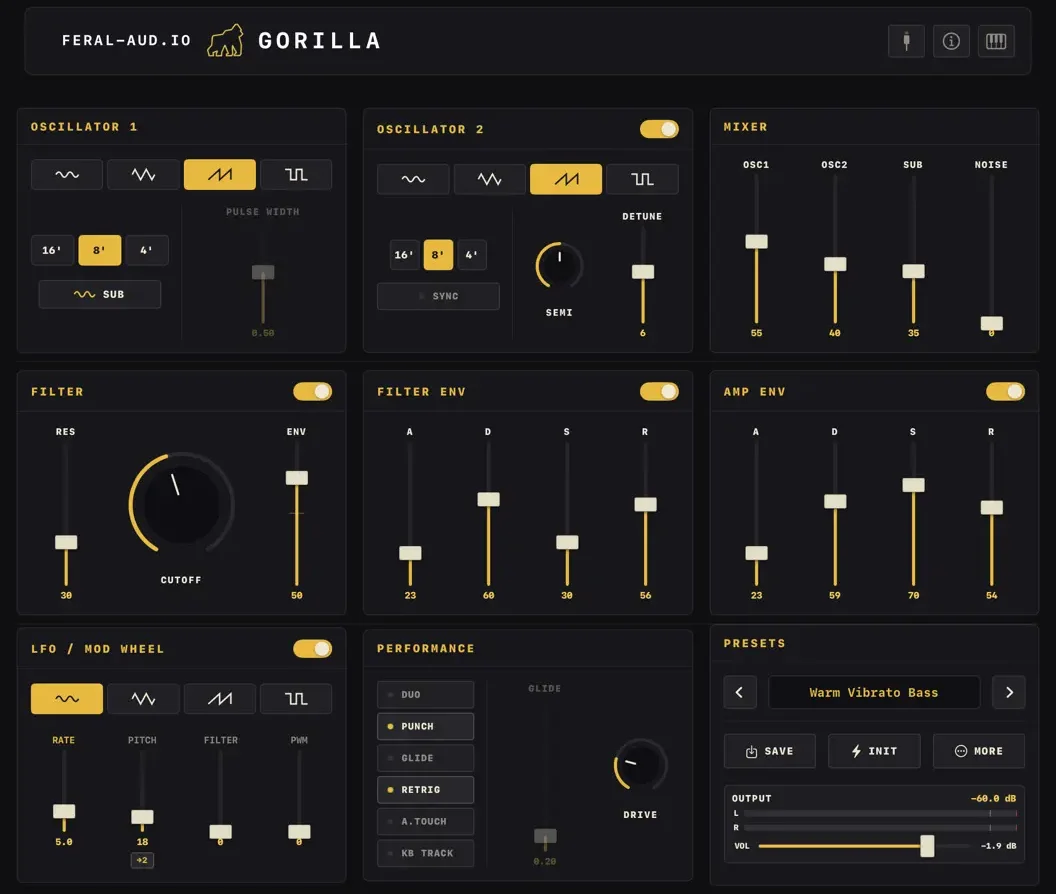
Developer Steffen Mølgaard Larsen understood this perfectly when he created Gorilla Synth—a raw, hands-on, analog-style subtractive synth for iOS and macOS. But what started as a great performance tool has rapidly matured into a fully fleshed-out studio instrument. With the back-to-back releases of Version 2.0 and 2.1, Gorilla Synth has leveled up its workflow, its aesthetics, and its AUv3 capabilities.
If you’ve been looking for a straightforward, heavy-hitting synth to drop into AUM or Logic Pro for iPad, here is why Gorilla deserves a spot in your plugin folder.
Version 2.1: The Dark Theme & Precision Routing
The most immediate change you’ll notice upon updating to version 2.1 is the visual redesign. Larsen has overhauled the interface with a highly refined dark theme, highlighted by warm amber accents. It brings a sleek, professional “late-night studio” vibe to the screen that is much easier on the eyes during long sessions, without losing the intuitive layout that made the synth great to begin with.
But 2.1 isn’t just about looks. It brings crucial under-the-hood routing updates:
- LFO Pitch Routing Toggle: You now have the choice to route your LFO pitch modulation to OSC2-only or to all oscillators. This is massive for sound design. By modulating only OSC2, you can create syncopated, detuned textures or complex vibrato layers while keeping your fundamental pitch (OSC1) completely stable.
- New Presets: Three brand new factory patches have been added to showcase the engine: Sync Chirp, Warm Vibrato Bass, and Shimmer Fifth Lead.
- Workflow Fixes: Double-tapping the EQ band sliders now correctly resets them to zero. Additionally, a bug where sharing presets via QR code failed to transfer the OSC2 coarse tuning (SEMI) data has been squashed.
The 2.0 Foundation: Unleashing AUv3 and iPhone Workflows
To fully appreciate 2.1, we have to look at the massive workflow changes introduced in the milestone 2.0 update just prior.
Before 2.0, iPhone users faced some limitations with screen real estate. Larsen fixed this by introducing a brilliant swipe-based horizontal panel UI. Now, iPhone users have full, uncompromised access to every single synth parameter—making it a formidable pocket sketchbook.
Furthermore, 2.0 completely overhauled how Gorilla talks to your DAW:
- Full AUv3 Parameter Exposure: Every knob and slider is now exposed to your host. You can map MIDI controllers, draw automation curves for the ladder filter cutoff, and sequence parameter changes in hosts like Loopy Pro.
- State Saving: The AUv3 state now properly saves and restores within your host projects, ensuring your custom patches load exactly as you left them.
A Refresher on the Core “Gorilla” Engine
For those new to the synth, what exactly is making the noise? Gorilla is designed around a classic, punchy architecture:
- Dual Oscillators: Plus dedicated Sub and Noise generators for thickening up your low end.
- Classic Ladder Filter: Modeled for smooth, musical behavior, even at high resonance settings.
- Duophonic Mode with Glide: Perfect for expressive, sliding leads that allow two notes to cross over one another.
- Dual ADSR: Dedicated, snappy envelopes for both the Amp and the Filter.
- Built-in Visualizer: A real-time spectrum and EQ visualizer sits at the top of the UI, giving you immediate feedback on your frequency content.
Technical Specifications & Availability
Gorilla Synth is an incredibly efficient plugin, weighing in at under 5MB, making it perfectly optimized for mobile workflows without draining your CPU overhead.
| Feature | Details |
| Plugin Format | Standalone & AUv3 Instrument |
| Synthesis Type | Analog-Style Subtractive |
| Platforms | iOS, iPadOS, and macOS (Apple Silicon / Mac Catalyst) |
| MIDI Features | CoreMIDI, Bluetooth MIDI, Full CC Mapping |
Steffen Mølgaard Larsen is actively refining this instrument based on user feedback, turning Gorilla Synth into a true staple for iOS producers.
App price: $4.99.
In-app purchases: None


Leave a Reply