
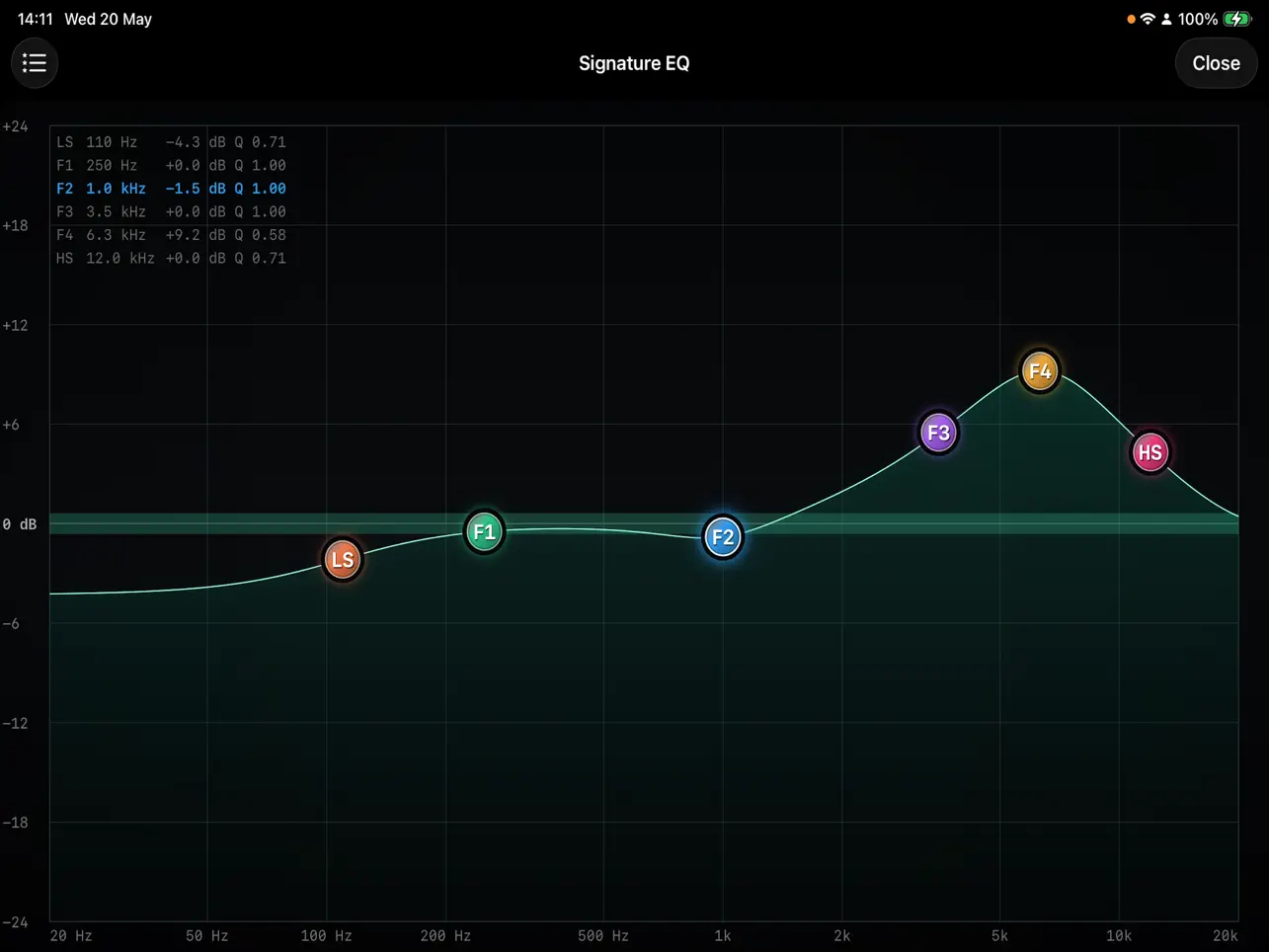
Most parametric EQ plugins on iOS give you a graph for reference and knobs for actual editing. SignatureEQ by Antonio Sorin Tasu — the developer behind AU Engine Core and the companion SignatureDYN — removes that split entirely. The frequency response display is the interface. You drag nodes to adjust frequency and gain simultaneously. You pinch to change Q. You double-tap to reset gain to zero. There are no separate sliders, no parameter panels, no numeric input fields — just the curve, the nodes, and your hands. This is a deliberate design choice, and it changes how quickly you can work on a touchscreen. On an iPad, moving a node with your finger and watching the curve respond in real time is faster than reaching for a knob, checking a readout, and confirming the number. For producers who want to EQ by ear and by eye without cognitive overhead, this interface approach makes more sense than a feature-heavy panel layout.
The six bands are arranged thoughtfully across the spectrum. Band 1 (LS) is a low shelf defaulting to 80Hz — the natural point for adding or pulling back bass body and warmth without touching the sub. Band 2 (F1) is a peak at 250Hz, which is where low-mid muddiness accumulates on most sources. Band 3 (F2) sits at 1kHz for mid-presence control — vocals, guitar body, piano fundamental all run through this range. Band 4 (F3) defaults to 3.5kHz, the upper-mid zone where attack, bite, and definition live. Band 5 (F4) is at 8kHz for presence and air. Band 6 (HS) is a high shelf at 12kHz for overall brilliance and top-end shaping. These default positions are not arbitrary — they correspond to the classic mixing reference points that experienced engineers reach for instinctively. You can move any band anywhere in the 20Hz–20kHz range, and you can change any band’s filter type, so F1 set as a high-pass filter for low-end cleanup is perfectly valid. The default layout is just a sensible starting point that covers most common tasks without reconfiguration. Gain per band runs from −24dB to +24dB. Q runs from 0.10 (very wide) to 20.00 (surgical notch territory). On the Low and High Shelf bands, the Q parameter controls shelf slope rather than bandwidth — a Q of 0.707 gives a maximally flat Butterworth shelf, tighter values steepen the slope.
The DSP underneath is built on Direct Form II Transposed biquad filters using the RBJ Audio EQ Cookbook coefficients — the standard reference implementation for parametric EQ design. What is notable is the precision: SignatureEQ runs in double-precision 64-bit floating point throughout. For an EQ, this matters more than it might seem. At high-Q settings near 20.00, narrow peak filters can introduce coefficient precision errors at 32-bit that show up as frequency accuracy drift at the extremes of the audible range. 64-bit eliminates that. The processing is zero-latency, stereo in and out, with atomic parameter updates and zero allocation on the audio thread — real-time safe for live performance. The gesture implementation is precise: dragging a node moves it on a logarithmic frequency scale, so the same physical finger distance covers the same perceptual pitch interval across the whole spectrum. The node follows the actual combined EQ curve rather than snapping to a fixed grid position, which means the visual feedback accurately represents the cumulative effect of all bands at that frequency — not just the isolated gain value of the selected band. That distinction matters when multiple bands overlap in the same frequency region.
SignatureEQ is an AUv3 plugin only — like SignatureDYN, it requires a host and does not run standalone. iOS 15.0 minimum. All 18 parameters (frequency, gain, and Q per band) are exposed for AUv3 automation, and preset recall updates all six bands simultaneously without requiring user interaction. In AUM, you can load SignatureEQ on individual channels alongside SignatureDYN — EQ first for tonal shaping, then dynamics for level control — and automate both from a single session. In Loopy Pro, scene switching can recall different EQ presets for different sections of a live set, which makes the preset automation genuinely useful rather than just a technical feature. The interface scales across iPhone and iPad without layout issues, and the band information readout in the top-left corner of the graph shows the selected band’s current frequency, gain, and Q values as a compact numerical confirmation — the one place where numbers appear, when you want to verify what your ear already heard.
The constraint worth naming is the same as for SignatureDYN: plugin-only means you need a working AUv3 host setup to use it. For producers already running AUM, Loopy Pro, or Logic Pro for iPad, that is not an obstacle — SignatureEQ slots straight into an existing session. For producers looking for a standalone EQ they can open directly from the home screen, this is not it. Given the developer also makes AU Engine Core, there is a clear ecosystem logic here: the Signature plugins are designed to run inside a proper host environment, and they feel like purpose-built components of a coherent system rather than generic utility apps. The graph-only interface is also worth flagging as a preference question rather than a universal strength. If you like to type exact frequency values, prefer numeric readouts over visual curves, or frequently work with very specific target frequencies (removing a 4,128Hz resonance rather than roughly cutting the upper mids), the lack of direct numeric input will slow you down. For producers who trust their ears and want to work visually and fast, the node-based approach is genuinely better on a touchscreen than any knob layout. At $5.99 with no in-app purchases and no subscription, it is a straightforward buy for anyone already running an AUv3 host setup who wants a properly engineered EQ that takes full advantage of the touchscreen rather than porting a desktop control scheme onto it.
Key features:
- Graph-As-Interface Design: The entire UI is the frequency response display — drag nodes for frequency and gain simultaneously, pinch for Q, double-tap to reset gain to zero. No separate sliders or panels.
- 6 Fully Parametric Bands: Low Shelf (80Hz default), Peak at 250Hz / 1kHz / 3.5kHz / 8kHz, and High Shelf (12kHz default) — all bands moveable across the full 20Hz–20kHz range with switchable filter types
- ±24dB Gain per Band: Full boost and cut range with Q from 0.10 (very wide) to 20.00 (surgical notch) on peak bands; shelf slope control on LS and HS bands
- 64-Bit Double-Precision DSP: Direct Form II Transposed biquad filters (RBJ Audio EQ Cookbook) — eliminates coefficient precision errors at high-Q settings that 32-bit processing can introduce
- Node Follows Actual EQ Curve: Each band node is positioned on the combined frequency response, not a fixed grid point — visual feedback accurately reflects the cumulative interaction of all active bands
- Band Information Readout: Top-left corner displays the selected band’s current frequency, gain, and Q as compact numerical confirmation alongside the visual display
- 18 Fully Automatable Parameters: Frequency, gain, and Q per band exposed for AUv3 parameter automation and instant preset recall in any compatible host
- Zero-Latency, Real-Time Safe: 64-bit float DSP, zero allocation on the audio thread — suitable for live performance and real-time monitoring
- AUv3 plugin for iPhone and iPad — host required (AU Engine Core or any compatible AUv3 host). iOS 15.0 minimum.
App price: $5.99. No in-app purchases. No subscription.
Original release: June 1, 2026 | Latest update: June 1, 2026 (v1.0)


