
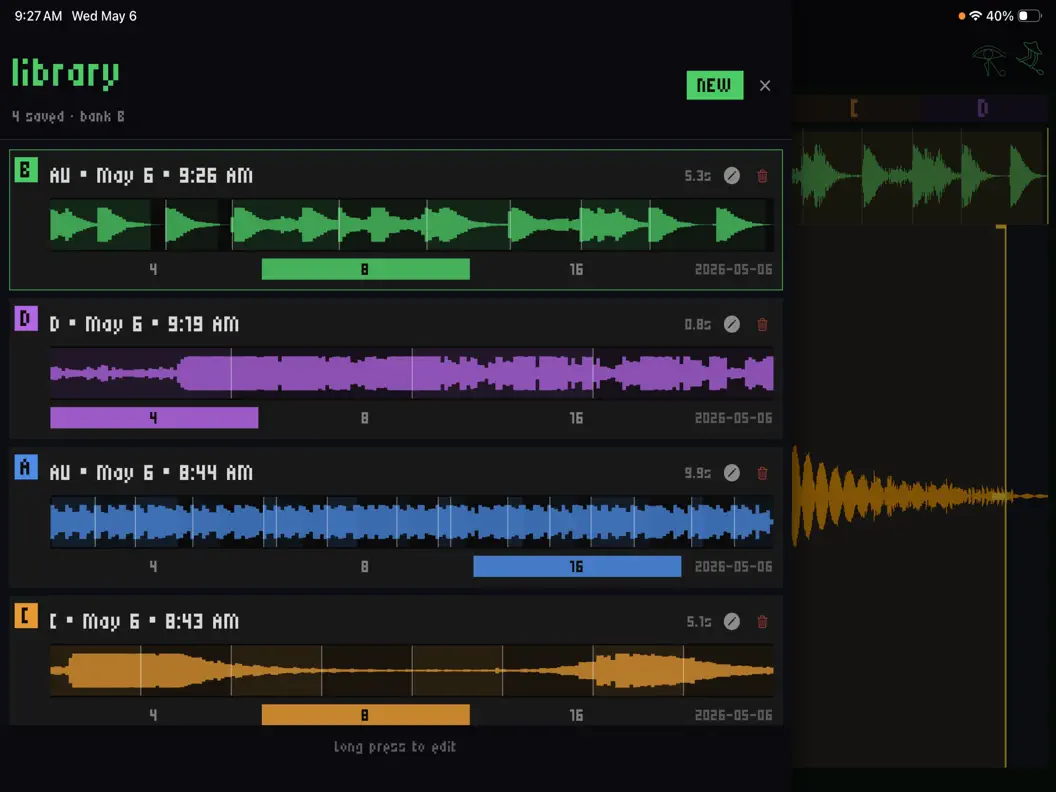
Developer Elijah Lucian (under the WaveLoop banner) has just rolled out Version 1.4.0 of Choppa, his lightning-fast loop slicer and instant sampler. With this update, Choppa transcends its traditional boundaries, morphing into a completely wireless, network-ready sampling track that integrates directly into your desktop or mobile DAW without a single cable.
What’s New in Version 1.4: The Link Audio Revolution
The headline feature of the 1.4 update is the complete overhaul of Choppa’s connectivity, utilizing Ableton’s latest network protocols to eliminate the friction of physical audio routing.
1. The Wireless Track Architecture
By toggling “USE ABLETON LINK” inside the settings menu, Choppa instantly broadcasts its master mix over your local Wi-Fi or wired network as a recognized Link Audio source.
If you open Ableton Live on your computer, or AUM and Loopy Pro on your iPad, you can simply open your track input picker and select “Choppa · [Your Device Name].” * Zero Cables, Zero Hassle: No virtual audio drivers, no lightning cables, and no external audio interfaces required.
- Bi-directional Magic: The tempo syncs flawlessly across the network. Hit record inside your host DAW, perform your chops live on your phone, and the audio drops directly onto your project timeline in real-time.
2. Radical UI Simplification
The initial implementation of network audio routing required navigating multiple menus, three separate knobs, and two confusing sheets. Version 1.4 condenses this workflow down to a single, intuitive toggle switch. Power users who still want to dig into Ableton’s native settings can easily access them via an “Advanced” tab, but for 95% of sessions, it is now a one-tap process.
3. AUv3 Hardening & Compatibility Fixes
For producers who prefer keeping everything running locally inside a single mobile host, the AUv3 plugin version has received registration metadata hardening. Certain strict iOS DAWs that previously filtered Choppa out of their plugin lists due to missing gate keys will now correctly scan and load it.
A Quick Tip on Stability: While Wi-Fi is incredibly responsive for quick sketch sessions, the developer notes that long-form recording takes or complex live performances will benefit greatly from a wired Ethernet-over-USB-C connection to guarantee zero packet drops.
What is Choppa? “Escape the Grid” Sampling
If you are new to the app, WaveLoop Choppa is an expressive, performance-oriented sampler built for songwriters, beatmakers, and live loopers who find modern DAW piano rolls creatively stifling. Heavily inspired by the immediate, low-friction sampling workflow of hardware like the Teenage Engineering OP-1 Field, Choppa is designed around the philosophy of “jam first, edit later.”
The Core Features:
- Instant Slicing: Drop a synth loop from a DAW or record a live vocal directly into your device’s microphone. Choppa instantly slices the audio into 4, 8, or 16 clean, mathematically distributed performance chunks mapped across responsive touch pads.
- Destructive Performance Tools: Choppa encourages happy accidents. Each individual slice can be reversed, assigned to choke groups (so a new hit cuts off the previous one), pitch-shifted, or manipulated on the fly.
- Advanced MIDI Control: Added in recent iterations, Choppa fully supports external controllers. It features deep MIDI velocity tracking, dedicated keys for hardware bank switching (Banks A/B/C/D), active pitch bend, and a robust MIDI Learn engine to map hardware CC knobs to volume, pitch, and looping per slice.
Standalone Freedom vs. AUv3 Power
Choppa operates in two distinct modes. In Standalone mode, it turns your iPhone into a pocket-sized hardware sampler—perfect for sampling environmental sounds on a walk or sketching beats on the couch. When you head back to the studio, it fires up as a full AUv3 Instrument Plugin inside Logic Pro for iPad, Cubasis, or GarageBand, acting as an integrated multi-sample player in your broader mix.
Technical Overview & Specs
Choppa is lightweight, fast, and purpose-built for rapid audio manipulation.
| Parameter | Specification |
| Plugin Format | Standalone & AUv3 Instrument |
| Latest Version | 1.4.0 (Released May 2026) |
| Key Protocol | Ableton Link Audio (Wireless Streaming) |
| Sampling Engine | 4, 8, 16 slice distribution per bank |
| MIDI Integration | Velocity support, MIDI Learn, Bank switching |
| System Requirements | iOS 17.0 / iPadOS 17.0 or later; Apple Silicon Mac (macOS 14.0+) |
App price: $4,99
In‑app purchases: None


Leave a Reply