
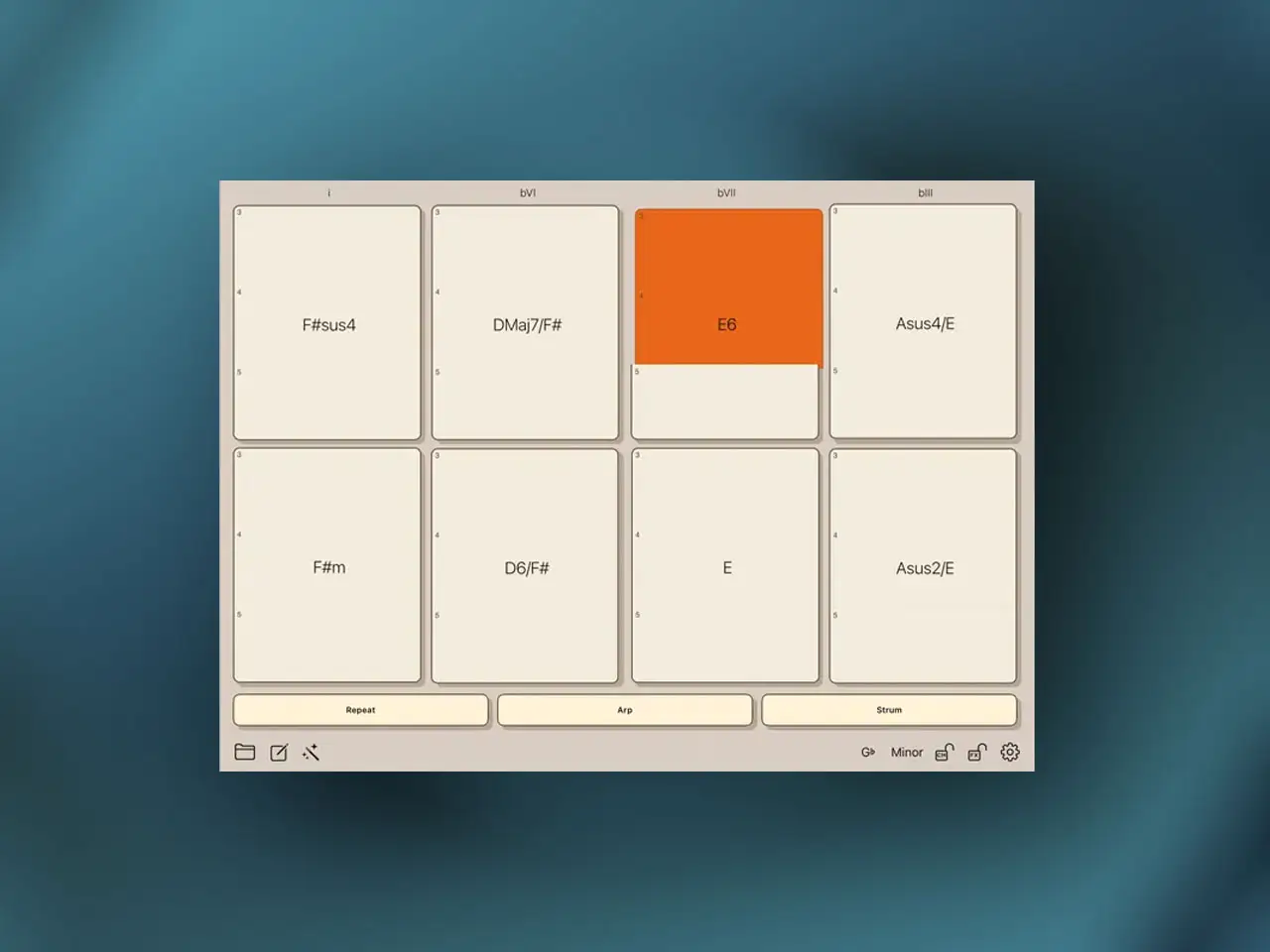
Cem Olcay has released HouseBud MIDI Chord Pads, a $4.99 AUv3 MIDI chord controller for iPhone, iPad, and Apple Vision. Olcay is known throughout the iOS music production community for the “Bud” series of MIDI utilities — StepBud, ChordBud, ArpBud, RhythmBud, ScaleBud, BreakBud, and others — each addressing a specific gap in the iOS MIDI workflow with a focused, open-source-friendly approach. HouseBud is his most performance-oriented release to date, built specifically around the idea that a chord pad surface should behave like a playable instrument rather than a static trigger bank. Community reception on the Loopy Pro forum at launch was immediately enthusiastic — described as an “instant pickup” and paired successfully with Retro Keys, steel guitar apps, and BLEASS synths within hours of release.
The Problem With Standard Chord Pads
Most chord pad apps on iOS give you a grid of buttons, one chord per button, and pressing a button triggers all the notes of that chord simultaneously as a fixed voicing. That works for quick sketch ideas but falls apart the moment you want to do anything expressive with it. The chord stays exactly the same pitch and register every time you press it. You can’t play high-register fills over a low-register block chord without switching apps or stacking a second instrument. You can’t create the kind of dynamic, octave-jumping performance that makes a keyboard part feel human. And unless you build in voice leading manually through preset management, moving from one chord pad to the next often sounds jarring because the note voicings don’t connect smoothly across the transition.
HouseBud addresses both of these problems with two core design choices that work together: octave-sliced pads and a Smart Harmony Engine.
Octave-Sliced Pads: Playing the Chord, Not Just Triggering It
Each chord pad in HouseBud is divided vertically into multiple octave registers. Tap the bottom of the pad to play a low voicing of that chord. Tap the middle for a mid-range voicing. Tap the top for a high-register inversion. Use two fingers simultaneously on the same pad to layer two registers at once — a low sub voicing plus a high treble inversion playing together from a single chord pad, without any secondary tap elsewhere.
The practical effect is that you can perform a chord progression with the same kind of register variety a keyboard player uses naturally. A pianist doesn’t play every chord in the same octave — they move up and down the keyboard to keep the harmony interesting, to create space in the arrangement, and to support the melody. HouseBud gives you that same freedom on a touchscreen surface without requiring the finger independence of a full keyboard. Tap low for the verse, move higher for the build, layer both for the drop. The octave slices mean the same pad expresses the chord differently depending on where on the pad you touch it, turning a static trigger into an instrument with vertical range.
Smart Harmony Engine and Voice Leading
The second core problem — jarring transitions between chords — is handled by the built-in Smart Harmony Engine. Rather than playing the raw default voicing of each chord in whatever fixed inversion is assigned to it, the engine voices the chords intelligently so that transitions between pads produce smooth melodic motion. The top note of one chord connects naturally to a nearby note in the next chord rather than jumping across octaves arbitrarily. This is basic voice leading, the same principle that piano teachers explain in music theory — and it’s exactly what makes chord progressions sound polished and musical rather than robotic.
The combination of octave slices and smart voice leading means you can move your hands across the pad surface improvising progressions in real time, and the result sounds like considered playing rather than button pressing. Users in the Loopy Pro forum specifically noted that pairing HouseBud with piano or electric piano AUv3 instruments (the Retro Keys comparison came up immediately) produces results that sound like session keyboard work.
Motion FX: Rhythm Without a Separate Sequencer
HouseBud includes a Motion FX engine with three modes that add rhythmic and textural animation directly to the chord output without requiring a separate sequencer app. Repeat triggers the chord rhythmically based on the host tempo — useful for deep house stabs and techno chord rhythms where you want the timing to be machine-precise. Arp breaks the chord into an ascending arpeggio, cycling through the notes in sequence — relevant for melodic techno patterns and ambient sequences where individual notes carry more weight than the simultaneous stack. Strum delays the attack of individual notes slightly, mimicking the slight temporal spread of a guitar strum — particularly effective when routing MIDI to electric piano or acoustic guitar plugins where that physical timing variation makes the performance feel more natural.
These three modes cover the practical range between “I need a chord and I need it to move rhythmically” and “I need the chord to feel like it was played by a person.” They work within the AUv3 architecture so they sync to host tempo automatically.
AUv3 MIDI Routing and Standalone Use
As an AUv3 MIDI effect, HouseBud routes into any AUv3-compatible host. In AUM you load it on a MIDI track and assign its output to any synth instrument in the session — the chord pads drive whatever synthesizer is downstream, from Moog Model D to the BLEASS synths to Roland ZENOLOGY GX. In Loopy Pro it works both as a live performance surface and as a clip trigger mechanism. In Logic Pro for iPad it inserts on a software instrument track and the MIDI output records directly to the track — your octave-sliced performances capture as MIDI data that can be edited in the piano roll afterward.
For sketching without a host, HouseBud includes a built-in sampler so you can hear chords playing through internal sounds immediately on launch. The standalone mode is a useful starting point, but the real workflow is the AUv3 routing — the sampler sounds are good enough to evaluate progressions, not to finalize productions.
Key features:
- Octave-Sliced Chord Pads: Each pad is divided vertically into multiple registers — tap low, mid, or high positions to play different voicings of the same chord, or use two fingers to layer registers simultaneously
- Smart Harmony Engine: Voices chords intelligently so transitions between pads produce smooth melodic motion — eliminates jarring octave jumps between chord changes
- Motion FX — Repeat: Triggers the chord rhythmically in sync with host tempo for stabs and groove patterns
- Motion FX — Arp: Breaks the chord into an arpeggio cycling through the notes for melodic sequences
- Motion FX — Strum: Delays individual note attacks to simulate a guitar-style strum — natural feel on electric piano and acoustic instruments
- Built-in Sampler: Standalone use with internal sounds for sketching progressions without launching a host
- AUv3 MIDI Effect: Route chord output to any synth instrument in AUM, Loopy Pro, Logic Pro for iPad, or any AUv3 host — MIDI records directly to the host track
- Pad MIDI Input: Accept MIDI from an external sequencer to trigger pads remotely — use as a harmonic hub for generative ambient setups
- Available on iPhone, iPad, and Apple Vision
App price: $4.99. No in-app purchases.
Original release: May 14, 2026 | Latest update: May 14, 2026


