
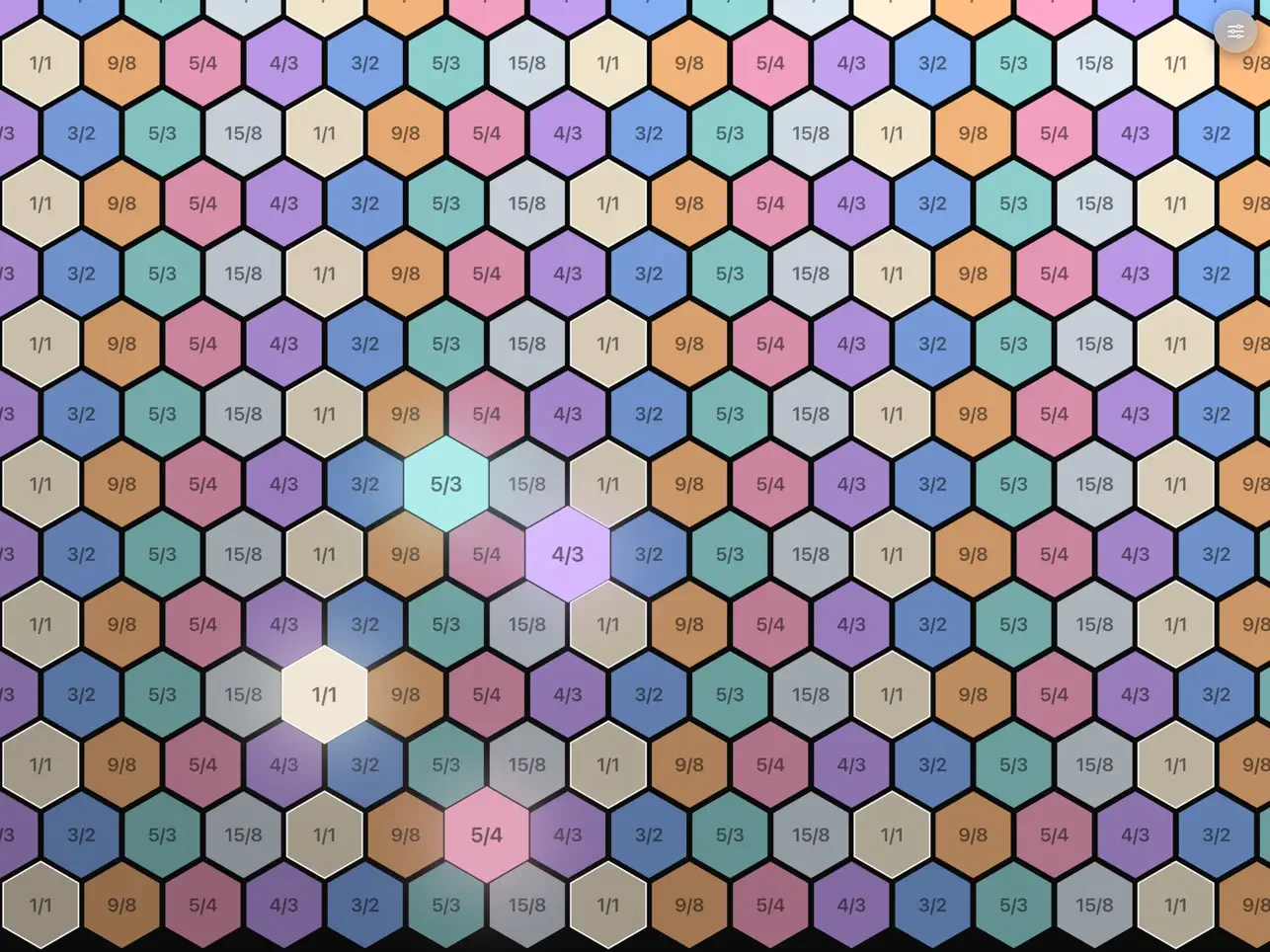
On a standard piano keyboard, a C major chord and an F# major chord look completely different. The white and black key pattern shifts under your fingers, the chord shapes change, and every new key signature requires relearning the same physical information in a new position. This is a consequence of the piano’s linear, non-isomorphic layout — not a musical law. Hexatone by Victorien Genna is built around a different proposition: a hexagonal grid where every musical interval always has the same shape, the same direction, and the same finger distance regardless of what root note you start from or how far up the grid you transpose. Play a major chord in one position, shift your hand to a different root, and the same three-finger shape produces the same chord. This isomorphic property is not a gimmick. It is a fundamentally different relationship between physical gesture and musical result, and for producers exploring microtonal harmony, alternate tunings, or simply looking for a more spatially logical approach to playing chords, it changes what is possible on a touchscreen. Hexatone is iPad-exclusive, free, and requires iPadOS 17.0 or later.
The microtonal support is where Hexatone earns serious attention from producers working outside 12-tone equal temperament. The app ships with six equal division of the octave (EDO) tuning systems built in: 12-EDO (standard Western tuning), 19-EDO (which provides purer minor thirds than 12-EDO and a more consonant major seventh), 22-EDO (used in some South Asian musical traditions and valued for its approximation of 7-limit harmonics), 24-EDO (quarter-tone tuning, doubling the standard chromatic scale), 31-EDO (one of the best approximations of 5-limit just intonation available in an equal temperament), and 53-EDO (an extraordinarily fine division that closely approximates both Pythagorean and 5-limit just intervals). Each of these is a complete tuning system with its own harmonic character and musical tradition, not simply exotic scales overlaid on 12-tone logic. Beyond the built-in EDOs, Hexatone accepts custom tuning files in the Scala .scl format — the universal standard for alternate tuning definition used by the xenharmonic music community. If you have a .scl file for any historical temperament, just intonation system, or experimental microtuning, you can load it directly into Hexatone and play it on the hexagonal grid. This makes the app compatible with effectively the entire documented universe of alternate tunings, not just the six presets.
The visual feedback system uses four color palettes — Pastel, Inferno, Turquoise, and Campfire — where the hue of each hexagon indicates its pitch class and the brightness indicates the octave. This dual-encoding approach means you can read both what note you are on and what register it sits in at a glance, without counting rows or tracking your position relative to a reference marker. In practice, it makes the grid navigable during live improvisation in a way that a uniform color layout would not. The four palettes offer different legibility characteristics under different lighting conditions and personal preference, which is a thoughtful inclusion for a live performance tool. On smaller iPad screens, dense grid configurations can make the individual hexagons cramped, and fast passages that involve adjacent notes require precise finger placement to avoid triggering neighboring pitches. On a 12.9-inch iPad Pro the touch targets are generous enough that this is not an issue. On a compact iPad with a high-density grid layout in a non-12-EDO tuning, it is something to factor in before a live set. The built-in sample engine handles playback of individual audio files mapped across the grid or multi-sampled instruments in SFZ format. SFZ is the open standard for multi-sample instrument definition used across both desktop and mobile production, which means acoustic piano libraries, orchestral samples, and ambient pad collections in SFZ format load and play in any tuning Hexatone provides — including microtonal ones, with the pitch shifting handled by the app rather than the sample library. Hexatone does not include an internal synthesis engine. All sound comes from user-supplied samples or SFZ instruments. This is not a limitation for producers with existing sample libraries, but producers expecting to generate electronic sounds from scratch will need to route Hexatone’s MIDI output to an external synthesizer plugin.
The MPE implementation is particularly important in a microtonal context. Standard MIDI sends pitch bend as a channel-level message, which means a pitch slide affects all currently held notes simultaneously. MPE extends pitch bend to the per-note level, so each finger on the grid can have its own independent pitch expression. For microtonal playing where glissandos between intervals that do not exist in 12-EDO are musically central, per-note pitch bend is not optional — it is the feature that makes the system expressive rather than just theoretically interesting. Hexatone transmits velocity curves and adjustable expression data per note, which means MPE-capable instruments in the host receive the full expressive range of each hexagon touch as an independent event. As an AUv3 controller in AUM, Hexatone feeds MPE data directly to any MPE-capable instrument plugin on the same channel, making it a practical performance controller for iOS synthesizers that support the format. In Logic Pro for iPad, it connects as an AUv3 MIDI controller and routes per-note expression to MPE instrument tracks, which opens up the microtonal hexagonal grid as a playable input surface for any Logic instrument that responds to MPE.
Hexatone is one of the more genuinely specialist tools to appear on iPad in recent memory. It is not trying to serve all producers — it is purpose-built for a specific and underserved workflow: playing and composing in alternate tunings with an expressive, logically structured control surface. For producers working in microtonality, xenharmony, or experimental composition, the combination of Scala file support, six built-in EDO systems, MPE per-note expression, and the isomorphic grid layout is a toolkit that simply does not exist elsewhere on iOS at any price, let alone free. The iPadOS 17.0 requirement rules out older devices, and the absence of a built-in sound source means it only makes full sense inside an AUv3 host environment or alongside an external synth. Neither of those is a design failure — they are consequences of the app’s focused scope. The isomorphic layout also has a genuine learning curve; producers expecting to sit down and immediately play familiar chord voicings will need to spend time internalizing a new spatial vocabulary before it becomes fluid. That investment pays off for anyone who works seriously with harmony across multiple roots or tuning systems, because the geometric consistency of the grid means what you learn in one position transfers everywhere.
Key features:
- Isomorphic Hexagonal Grid: Every musical interval has the same geometric shape, direction, and distance regardless of root note or transposition position — chord shapes learned in one position work everywhere on the grid
- Six Built-In EDO Tuning Systems: 12, 19, 22, 24, 31, and 53 equal divisions of the octave — each a complete tuning system with distinct harmonic character
- Scala .scl File Support: Import any alternate tuning in the universal Scala format — compatible with the full range of historical temperaments, just intonation systems, and experimental microtunings
- Built-In SFZ and Sample Engine: Load individual audio files or multi-sampled SFZ instruments directly into the grid — acoustic and ambient libraries play in any loaded tuning system
- Full MPE Support: Per-note pitch bend, velocity curves, and adjustable expression data transmitted independently per finger contact — essential for expressive microtonal performance
- Dual-Encoded Visual Feedback: Four color palettes (Pastel, Inferno, Turquoise, Campfire) where hue indicates pitch class and brightness indicates octave for fast grid navigation in live performance
- Flexible Grid Configuration: Adjustable density and layout to fit different screen sizes and playing styles
- AUv3 controller and standalone on iPad — iPad exclusive, iPadOS 17.0 minimum
App price: $4.99. No in-app purchases.
Original release: June 2026 | Latest update: June 2026


