
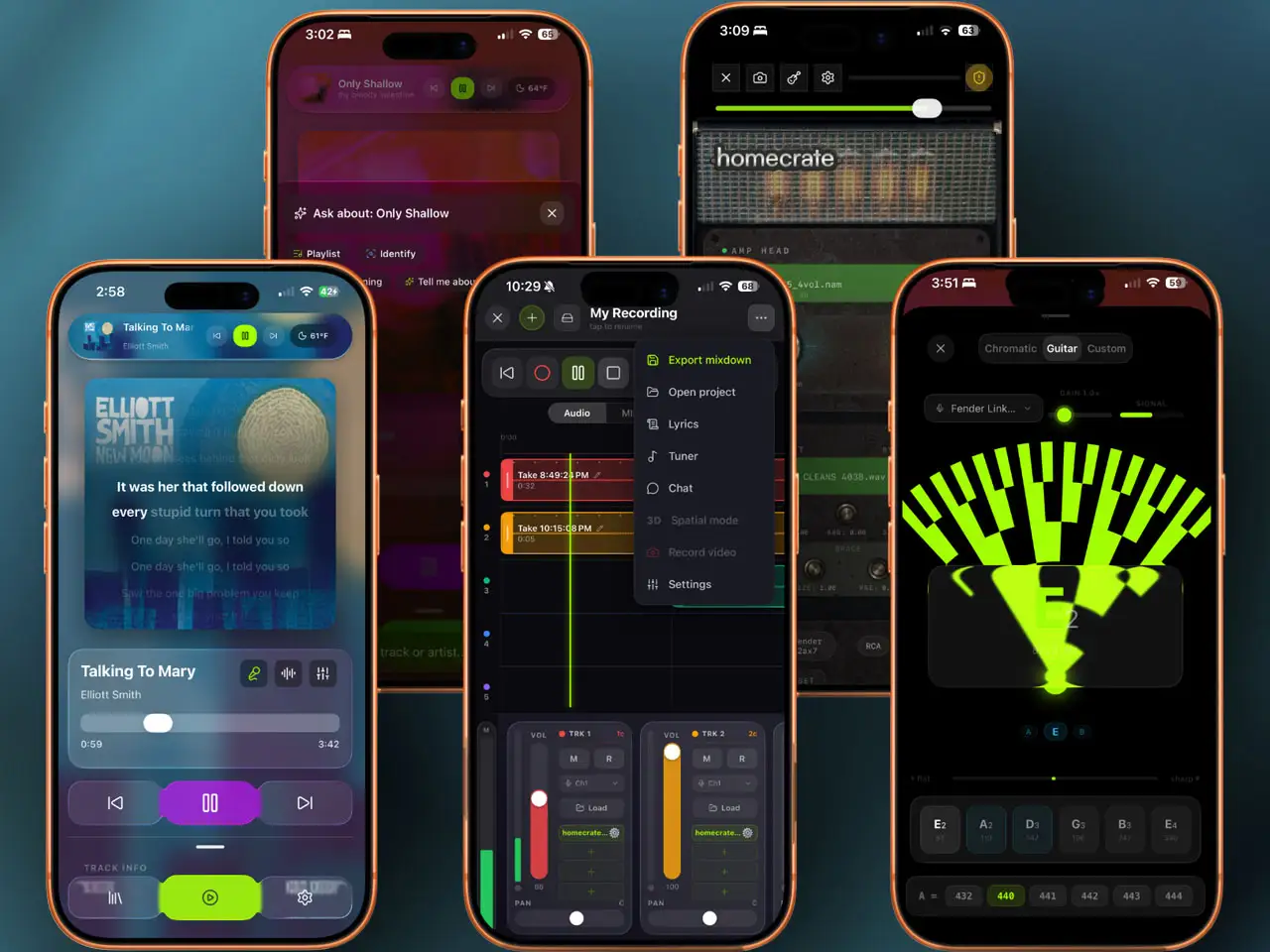
When you first look at Homecrate, it’s easy to see it as a sleek, privacy-focused alternative to the stock Music app. But for those of us on the production side, the real magic happens under the hood of its “Studio” features.
The developers have taken a unique approach: instead of building a DAW that you have to “import” everything into, they’ve built a creative environment that lives directly on top of your local music and sample library. It bridges the gap between listening, practicing, and full-blown music production on the iPhone and iPad.
Here is a deep dive into the “Studio” side of Homecrate and why it’s becoming a secret weapon for mobile creators.
1. A DAW for the “Local” Producer
The core philosophy of Homecrate is ownership. In an era of subscription-based cloud DAWs, Homecrate focuses on your local files. The Studio tab provides a streamlined multitrack environment where you can pull in stems, samples, or field recordings directly from your device storage or your Homecrate player library without any “processing” or “uploading” lag.
It’s a distraction-free space. You aren’t constantly being pushed toward a loop store or a subscription. It’s just you, your files, and a very capable timeline.
2. AI-Powered Creative Tools (Stem Separation)
One of the standout features for producers and remixers is the integrated AI Stem Separation. If you have a local file—say, a demo you recorded years ago or a track you want to remix—Homecrate can split it into:
- Vocals
- Drums
- Bass
- Instruments
In the Studio mode, these aren’t just for listening. You can immediately drag these separated stems into the multitrack sequencer to start building a new arrangement. It’s essentially a “sampling station” that allows you to deconstruct music in seconds.
3. Practice, Transcription, and Arrangement
For the “Music Making” side, Homecrate includes tools that make it a perfect rehearsal and sketching companion:
- Advanced Looping: You can set high-precision loops within the Studio timeline to practice a difficult solo or to “stress-test” a drum loop you’ve just created.
- Pitch and Tempo Manipulation: You can shift the key or speed of individual tracks in the Studio without affecting the pitch (and vice versa). This is vital when you’re trying to fit a sample into a project that’s in a different key.
- Transcription Support: The app includes AI-driven transcription, which is incredibly helpful for songwriters trying to document lyrics or melodies on the fly while they’re arranging.
4. The Mixer and FX Chain
The Studio side isn’t just for moving blocks around; it features a dedicated mixing environment. Each track has its own volume, pan, and FX slots.
- Built-in Effects: It comes with high-quality core effects like EQ, Reverb, and Delay.
- AUv3 Support: Most crucially for iPad power users, the app is designed to work within the broader iOS ecosystem, allowing you to use your favorite external plugins to process your local library.
5. Why it works for the Studio
The biggest hurdle in mobile music making is often file management. We spend half our time moving files from Files.app to a DAW, then to a player to check the mix.
Homecrate solves this by making the Player and the Studio the same thing. You can finish a mix in the Studio, and it’s instantly available in your Player library to listen to on your headphones while you’re out. It closes the loop between “producing” and “consuming” your own music.
Key features:
- Multitrack Studio: Desktop-class timeline for arranging local audio files with per-track volume, pan, and FX
- On-Device AI Stem Separation: Splits local files into vocals, drums, bass, and instruments — no cloud upload, full privacy
- Pitch and Tempo Control: Independent key and speed adjustment per track without artifacts
- Precision Looping: High-accuracy loop points for practice or stress-testing arrangements
- AI Transcription: On-device lyric and melody capture for songwriting sessions
- Built-in Effects: EQ, Reverb, and Delay on every track with AUv3 plugin support
- High-Res Audio: Full FLAC, WAV, and high-bitrate MP3 playback and editing
- Privacy-First: No tracking, no data collection, no accounts required
- Standalone on iPhone and iPad — player and studio share the same local library
App price: Free.
In-app purchases: Studio Upgrade — $9.99 (one-time, unlocks full multitrack Studio features). Additional “Crate” tier IAPs available for expanded functionality.
Original release: 2026 | Latest update: 2026


