
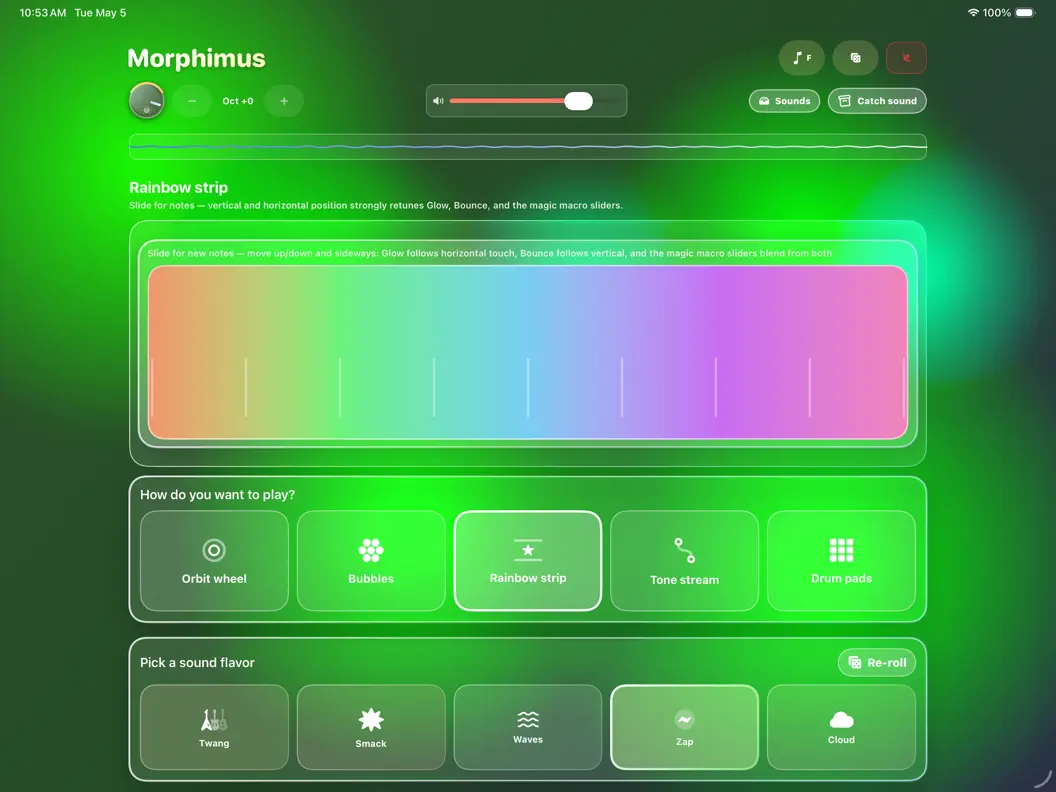
Sean Ian Halenwood has released Morphimus, a $4.99 standalone gesture-based synthesizer for iPhone and iPad. The app replaces the standard piano keyboard interface with five touch-interaction zones — a ribbon-style strip, a circular arpeggiator, floating melodic elements, and drum pads — all designed around sliding, tapping, and spinning rather than pressing discrete keysr. It is a self-contained playground for real-time sound exploration, sized at approximately 2.5 MB with no account requirements and no in-app purchases. The iOS requirement listed in the App Store is worth verifying before purchase — confirm your device meets it. There is no AUv3 support, no MIDI in or out, no Ableton Link, and no Inter-App Audio in the current version. The app cannot be loaded into AUM, Logic Pro for iPad, Loopy Pro, or any other host.
That constraint is the most important thing to state plainly upfront. Morphimus is not a production tool in any meaningful sense for producers running an established iOS setup. It cannot contribute audio or MIDI to a session in another app. It cannot accept MIDI from an external keyboard or controller. It generates sound only within itself. For a community that treats AUv3 compatibility as a baseline expectation for paid apps, the absence of those features at $4.99 — the same price range as focused, capable AUv3 tools from established developers — positions Morphimus squarely as a toy rather than an instrument. Whether that’s a problem depends entirely on what you want from it.
What the Interface Actually Offers
The five control zones cover different sonic roles. The Rainbow Strip functions similarly to a ribbon controller or XY pad — sliding across the color band triggers notes while modulating spectral parameters simultaneously. It’s a single continuous gesture surface where pitch and timbre change together rather than separately, which is the kind of immediate feedback that makes a gesture interface feel responsive rather than arbitrary. The Orbit Wheel is a circular arpeggiator module. Users can physically spin the wheel manually to change note intervals, or lock it into automated rotation at variable clock divisions. The combination of manual spin and automated motion means you can start an arpeggio and then interact with its direction and rate without stopping playback.
The Tone Stream and Bubbles zones are floating interactive elements mapped to melodic scales. Tapping or gliding across these produces melodic plucks or ambient clouds depending on touch velocity and duration. The Drum Pads provide fixed trigger points for rhythmic components — not a sequencer, but immediate hit triggers for building percussive texture alongside the melodic zones. All five zones can be used simultaneously with multi-touch, which is where the gesture-based philosophy shows the most potential: a thumb on the Orbit Wheel, fingers gliding through the Tone Stream, and a palm near the Rainbow Strip produces a layered performance that no keyboard-based interface would generate the same way.
Randomization: The Core Workflow Mechanic
Because there are no exposed synthesis parameters or patch editors in Morphimus, discovery happens through two re-roll functions. Flavor Re-Roll randomizes the underlying oscillator models and sound architectures while keeping your active musical scale, key signature, and sequencer settings locked. You keep the musical context you’ve set and get a new timbre underneath it. Global Re-Roll resets everything: play-style layouts, synthesizer behavior, global key, and active effects layers shuffle simultaneously into an entirely new configuration. The distinction matters — Flavor Re-Roll is exploratory within a structure, Global Re-Roll is a complete reset. A local preset system lets you save, name, and recall states you want to return to after randomizing away from them.
There is something genuinely appealing about a synth that hides its internals and exposes only touch and randomization as controls. It removes analysis paralysis and forces a different kind of engagement with sound — more like playing an instrument than programming one. The question is whether the sound quality and interface responsiveness justify $4.99 alongside everything else available at that price point on the App Store. Given the absence of any DAW integration, the honest use case is: casual exploration on a phone during a commute, sketching melodic ideas to hum or sing back into a production later, or an accessible introduction to synthesis for someone not interested in technical controls. For producers with established setups looking to add a sound source or effect, this isn’t the right tool in its current form.
The developer has not published a roadmap for AUv3 or MIDI support. Worth keeping an eye on if the interface approach appeals — if those features arrive in a future update, the value proposition changes significantly.
Key features:
- Rainbow Strip: Ribbon/XY-style continuous controller — sliding triggers notes while shifting spectral modulation simultaneously
- Orbit Wheel: Circular arpeggiator — spin manually to change note intervals or lock into automated rotation at variable clock divisions
- Tone Stream and Bubbles: Floating interactive elements mapped to melodic scales — tap or glide for plucks or ambient clouds
- Drum Pads: Fixed trigger pads for rhythmic components
- Flavor Re-Roll: Randomizes oscillator models and sound architecture while keeping scale, key, and sequencer settings locked
- Global Re-Roll: Full randomization of play-style layout, synthesizer behavior, key, and effects layers simultaneously
- Preset Management: Save, name, and recall generated sound states locally
- 2.5 MB footprint — no account required, no in-app purchases
- No AUv3, no MIDI In/Out, no Ableton Link, no Inter-App Audio — standalone only in current version
App price: $4.99. No in-app purchases.
Standalone only. Verify iOS version requirement against your device before purchasing.
Original release: 2026 | Latest update: 2026


