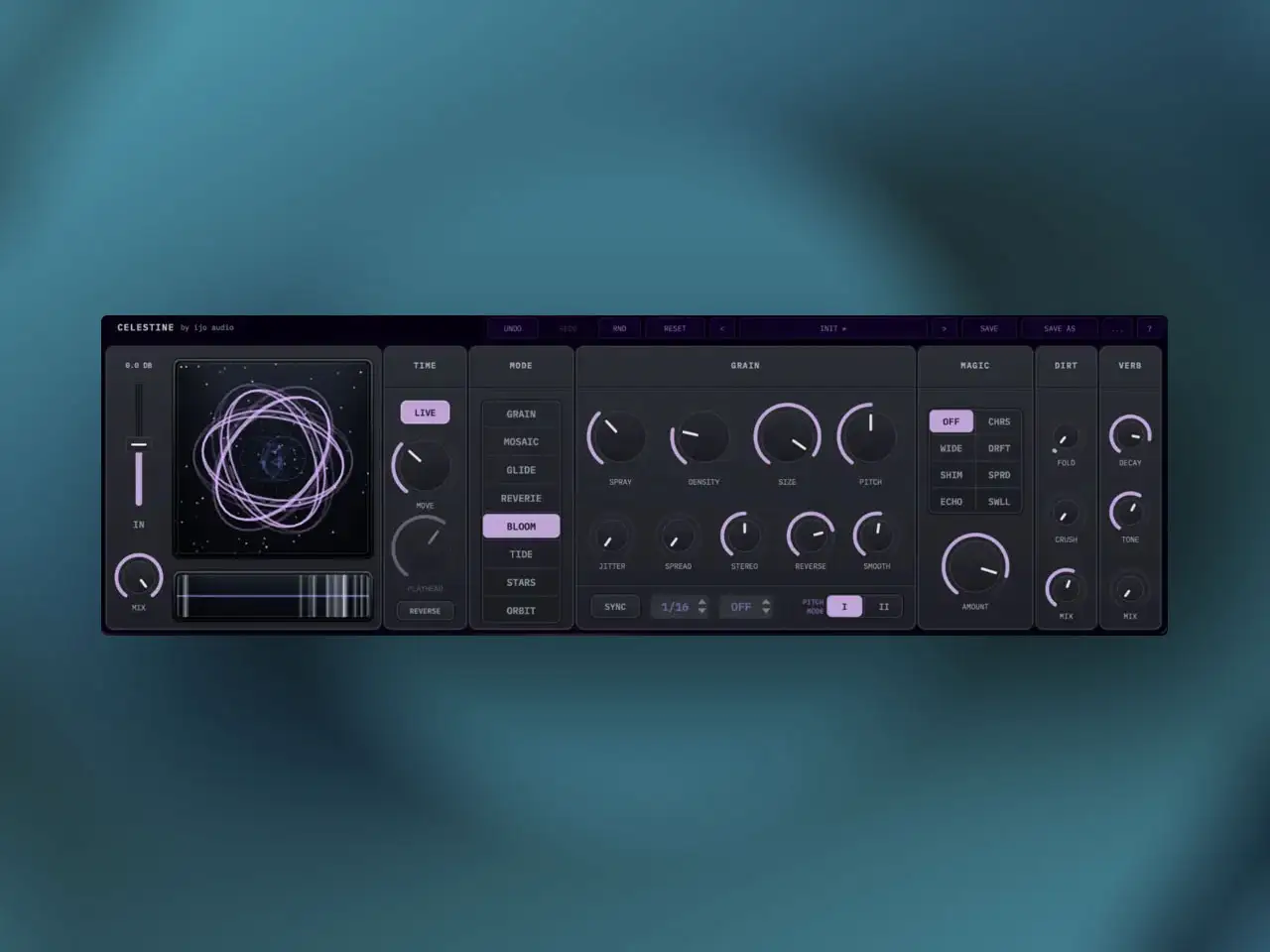
Ian Johnston of ijo audio has opened pre-orders for Celestine Granular FX on the iOS App Store at $5,99 with the full release expected within weeks. Celestine began as a Max for Live device that attracted a dedicated following among ambient and experimental producers using Ableton with Push 3 Standalone. Johnston spent four months rebuilding the entire engine from the ground up for iOS — not porting, not wrapping, but a complete reconstruction to ensure it runs stably as a standalone app and AUv3 in iOS hosts. The Loopy Pro forum thread that preceded the release was active throughout that development period, with Johnston posting updates directly. He confirmed the App Store submission is complete and described the release as “a couple weeks away” from his most recent post.
What makes this worth watching before it officially releases is the track record of the M4L version and the specific design philosophy behind it. Celestine is not a sample-based granular instrument and it is not a file-import granular effect. It works entirely in real time from a continuously rolling one-bar buffer — always recording, always discarding, always ready to fragment whatever is currently happening in the signal. That architectural choice has practical consequences for how you use it, how it sounds, and what kinds of performances it enables that conventional granular tools cannot.
The Rolling Buffer: How Real-Time Granular Actually Works Here
A lot of granular tools on iOS require you to either import an audio file or record a sample before granular processing begins. Celestine skips both steps. The buffer is always running — the moment you open the app and route audio through it, grains are being generated from whatever is in that one-bar rolling window. Play a guitar chord and the buffer is full of that chord. Keep playing and the buffer updates continuously. Stop playing and the buffer holds the last bar of what it captured until new audio comes in.
The seam-safe, click-free interpolation-aware DSP that Johnston built into the iOS version (mentioned explicitly in the developer’s forum posts) handles the moment-to-moment transitions between what’s in the buffer and what’s being granularized without the artifacts that real-time granular processing typically produces at buffer boundaries. The 30-voice grain pool with smoothing and normalization keeps the output consistent across the full dynamic range of whatever source you’re feeding in — a quiet, delicate guitar section and a loud overdriven chord both produce usable granular output without manual gain management.
The Live button changes the relationship between the buffer and the performance. Press it and incoming audio recording freezes — the buffer holds its current contents indefinitely regardless of what you play afterward. This turns a brief moment of interesting material into a permanent texture source: hit a guitar harmonic that sounds interesting, freeze the buffer on it, and spend the next five minutes exploring all eight granular modes on that one captured fragment. The playhead scrubbing and eighth-note grid positioning give you precise control over which part of the frozen bar you’re pulling grains from. In AUM and Loopy Pro, this means you can freeze a texture mid-performance and continue manipulating it while the rest of your session keeps playing around it.
Eight Modes: Different Grain Behavior, Not Just Different Settings
Most granular plugins have one grain engine with a large number of parameters. Celestine has eight genuinely distinct engines, each implementing a different mathematical approach to how grains are selected, pitched, and played. They are not the same algorithm with different presets — switching modes changes the fundamental behavior of the grain generation.
Celestine has eight genuinely distinct engines, each implementing a different mathematical approach to how grains are selected, pitched, and played.
Grain Mode is the classic layout: incoming audio splits into overlapping clouds with a musical perfect-fifth pitch-shifting system inspired by boutique guitar pedals. The harmonic character of the shifted grains stays musically coherent rather than producing dissonant artifacts at wide pitch intervals.
Mosaic Mode builds harmonic clouds by forcing grains into chordal intervals — four preset harmonic colors (perfect fifths, major chords, minor scales, discordant variations) shift the output from background texture into something closer to a chord voicing on whatever source you feed in. Feed a mono bass synth into Mosaic and it starts playing chords; feed a vocal and it generates choral pads from the voice.
Glide Mode implements internal micro-portamento within the grain cloud — individual grains smoothly slide up or down in pitch rather than jumping to a fixed pitch value. The effect sounds like the grains are bending into each other, which produces a distinctly elastic quality different from standard pitch-shifted granular output.
Revery Mode forces every grain into reverse playback and passes it through tape-like wow and flutter emulation. Reversed grains have a specific swell-in character — they build energy at the tail end of the reversed fragment rather than at the attack — and the flutter adds the slow pitch drift of a worn tape machine on top of that reversal. The combination produces something genuinely vintage in character rather than the clean reversed-reverb effect most plugins offer.
Bloom Mode adds a secondary “ghost” grain every time a primary grain fires — detuned and delayed slightly, creating acoustic halo reflections that trail the main grain output. The effect adds spatial depth without adding reverb; the halos come from the same source material at slightly different pitch and timing, which reads as acoustic reflections rather than algorithmic decay.
Tide Mode uses a global LFO to collectively swell and recede the playback rate of the entire grain cloud — the grains breathe in and out together, producing an ocean-like push and pull across the texture. This is particularly effective on pad material where static granular processing creates a frozen quality; Tide makes that texture feel alive.
Stars Mode positions grains at fixed, repeatable “constellation” points across the buffer rather than at dynamic positions that change with the current write head location. When the buffer loops, the same grain positions recycle in the same order, creating stable looping patterns from the captured material. The patterns feel composed rather than random — useful for building rhythmic granular loops from live material.
Orbit Mode causes grains to spiral around the write head over time, creating a continuous rotation of grain position relative to the present moment. The texture circles rather than sitting static, which produces a planetary, slowly-moving quality that works well under long-form ambient performances where the granular layer needs to shift without being actively performed.
Sync, Grid, and Rhythmic Modes
Every one of the eight modes has a Sync toggle. With sync off, grain generation scatters fluidly with no relationship to host tempo — the output is atmospheric and loose. With sync engaged, grain generation locks to the project tempo and grain size parameters shift from milliseconds to rhythmic values (16th notes, 8th notes, and so on). The transition between these two behaviors is instant and can be automated from a host. This makes Celestine useful across a much wider range of production contexts than typical ambient granular tools: synced mode works for anything from groove-oriented electronic production to cinematic scoring where rhythmic precision matters.
The End-of-Chain FX Suite
Celestine includes a secondary effects layer that sits after the granular engine and handles the final shaping of the output. The Dirt panel combines a wavefolding distortion engine with a bitcrusher — wavefolding generates rich harmonic overtones from the granular material while the bitcrusher adds lo-fi edge and reduction artifacts. These are independent controls that work together or separately depending on how much character you want on top of the granular texture. The Dreaming Reverb is a dedicated hall processor with an extended decay control — at its maximum, the decay extends long enough to function as an ambient freeze, sustaining the granular tail indefinitely. The Magic Panel contains seven proprietary spatial algorithms controlled from a single dial, shifting the stereo field and spatial character of the output across a range of distinct processing approaches without requiring individual FX bypass management. Together these three processors cover everything from subtle widening to aggressive distortion and frozen reverb, all within Celestine itself — you don’t necessarily need additional downstream effects to get a finished texture out of it.
The Context: Why This Matters for iOS
The iOS granular landscape has excellent tools already — GrainHeads by Andrei Nevar covers the sample-based end with deep sequencer integration, and Bleass Granulizer handles real-time granular on the insert FX side. Celestine’s angle is different from both. It’s designed first around the boutique guitar pedal philosophy of immediate sonic gratification from live input — you plug in a source, you get interesting granular output immediately, and the eight distinct mode personalities give you a wide palette of radically different responses to the same incoming signal. The M4L community reception confirms the approach works: Andrew Tasselmyer of Hotel Neon used it in published recordings within weeks of the M4L version’s release. The iOS rebuild means that workflow is now available in AUM, Loopy Pro, and any other AUv3 host on iPad. The pre-order at $5,99 is the launch price — once released, the price may increase.
Key features:
- Real-Time Rolling Buffer: Continuously captures a one-bar window of incoming audio — no sample import or pre-recording required. Seam-safe, click-free, interpolation-aware DSP with 30-voice grain pool and smoothing/normalization
- Live Button / Buffer Freeze: Freezes incoming audio recording to hold and explore a captured moment indefinitely without affecting the rest of the session
- Playhead Scrubbing and Eighth-Note Grid: Manual drift across the buffer with optional grid lock to eight eighth-note positions for rhythmic precision
- 8 Distinct Granular Engines:
- Grain — classic overlapping clouds with perfect-fifth pitch-shifting
- Mosaic — harmonic chord clouds in four colors (fifths, major, minor, discordant)
- Glide — micro-portamento between grains for elastic pitch sliding
- Revery — full reverse playback with tape wow and flutter emulation
- Bloom — primary grains plus detuned ghost reflections for acoustic halo depth
- Tide — LFO-driven collective swell and recession of playback rate
- Stars — grains locked to fixed constellation positions for stable looping patterns
- Orbit — grains spiral around the write head over time for continuous rotation
- Sync Toggle (All Modes): Switches grain generation from fluid scatter to host-tempo rhythmic grid — grain size parameters shift between milliseconds and rhythmic values
- Dirt Panel: Wavefolding distortion engine plus bitcrusher — independent controls for harmonic character and lo-fi reduction
- Dreaming Reverb: Hall processor with extended decay — maximum decay functions as an ambient freeze for sustained tails
- Magic Panel: Seven proprietary spatial algorithms on a single dial — instant spatial character shifting without individual plugin management
- AUv3 and Standalone for iPhone and iPad — rebuilt from scratch for iOS over four months from the original Max for Live version
App price: $5.99 (pre-order at launch price — may increase after release).
No in-app purchases.
Original M4L release: Late 2025 | iOS pre-order opened: May 2026 | iOS full release: Imminent