
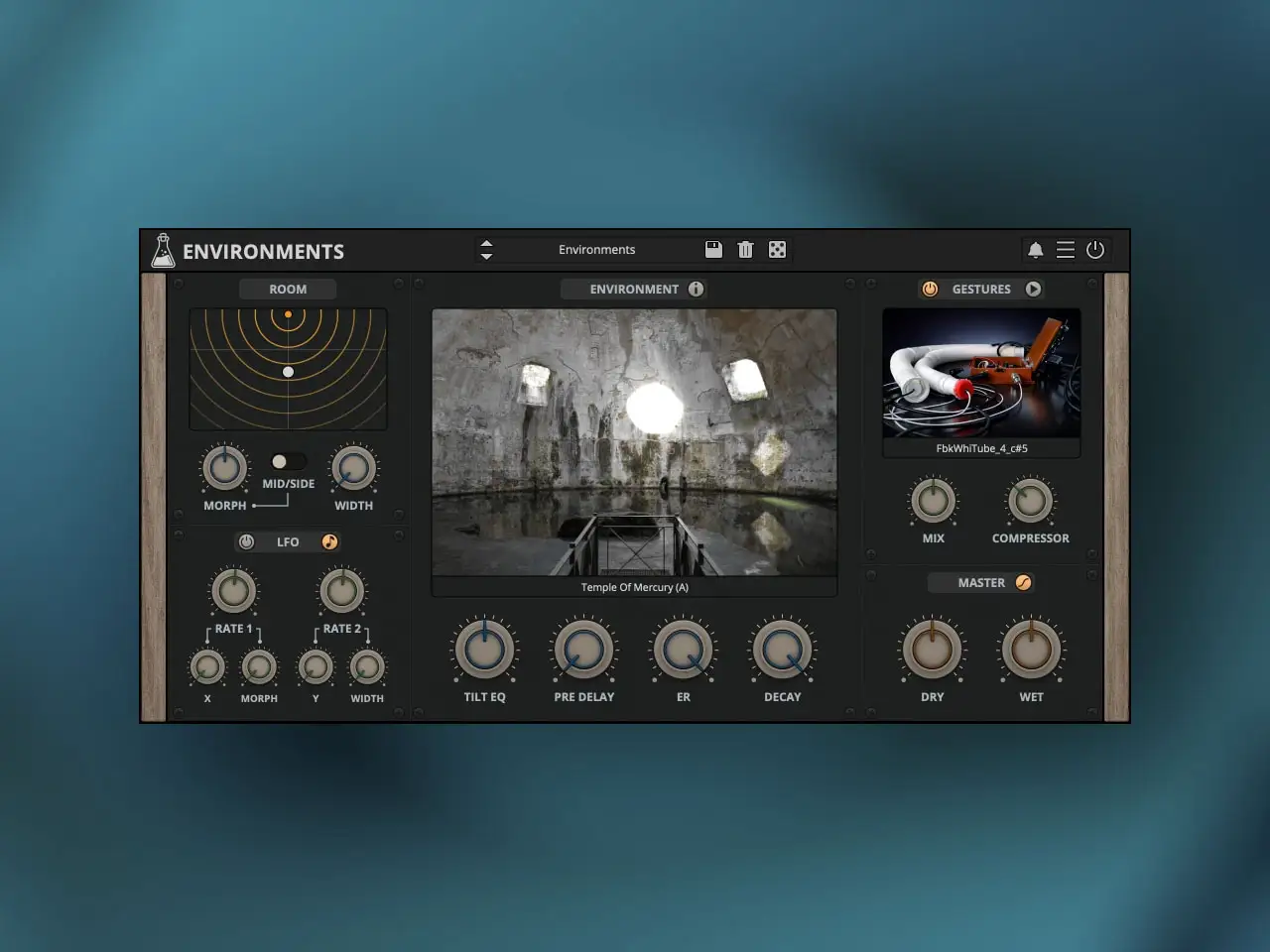
AudioThing has released Environments – Acoustic Spaces, a reverb plugin that breaks from the standard dichotomy between algorithmic and convolution processing. Released May 14, 2026 for iOS, macOS, Windows, and Linux, it is built around impulse responses captured from two extraordinary historical sites near Naples: the Temple of Mercury at Baia and the Piscina Mirabilis cistern. But the spaces themselves are only the starting point. The plugin makes them interactive, modular, and — through the Gestures layer — genuinely alive in ways that static convolution reverbs cannot be. iOS pricing is $9.99 for the full version, with a free trial available (3 seconds of silence every 45 seconds, saving disabled).
The Spaces: Why These Locations
Most convolution reverb libraries capture concert halls, studios, and churches — spaces with known, predictable acoustics that producers want to recreate faithfully. AudioThing went somewhere different. The Temple of Mercury at Baia, formally a 1st-century BC Monumental Thermal Hall from the Baths of Baia and a direct architectural precursor to the Pantheon, features a perfect hemispherical dome vault. The floor is now partially covered in water because of bradyseism — slow geological movement that has gradually submerged the ancient coastline around the Phlegraean Fields west of Naples. That water surface, combined with the curved tophus stone walls, creates a reflection geometry where a whisper on one side of the space travels across to the other as a clearly audible, haunting echo. The room doesn’t just add reverb; it communicates.
The Piscina Mirabilis is the largest Roman drinking water cistern ever built. It consists of a subterranean grid of 128 pillars supporting massive cross vaults — a stone forest beneath the ground that yields an extraordinarily dense, complex reverberation tail. The decay from this space is not smooth and linear like a concert hall; it layers and stacks as each pillar and vault reflects differently, creating a structural complexity that no algorithm can convincingly recreate from first principles. AudioThing captured both spaces from multiple physical positions, giving the plugin three main spaces total, each available from two position variants (A and B).
The Convolution Engine and Room Simulator
The core technical limitation of conventional convolution reverb is that loading an impulse response fixes you to one position in one moment of that space. You can adjust the tail, the pre-delay, and the wet/dry mix, but the fundamental character doesn’t change. Environments addresses this with a multi-IR convolution engine that blends between different impulse response sets rather than switching between them discretely. The Morph control moves smoothly through the captured spatial data — lower values bring out the darker, fuller resonance of being deeper in the space, while higher values shift toward the bright early reflections of being closer to the walls.
The Room Simulator presents this as an interactive XY display. Drag a node through the virtual space and the convolution character changes based on your simulated position relative to the sound source. It’s not just a graphic equalizer dressed up as a floor plan — it’s genuinely changing the IR blend as you move. In AUM, you can automate the XY position over time, creating a sense of movement through the space across the duration of a track. In Logic Pro for iPad it inserts as a standard AUv3 effect with full parameter automation on every control including the XY axes.
Mid/Side processing adds another layer of spatial control. The incoming audio splits into Mid and Side components that route through completely different impulse responses. The result is stereo imaging that goes beyond simple width adjustment — the center and the sides of the stereo field carry different acoustic characters from the same space, which creates an enveloping quality that’s extremely difficult to achieve with standard reverb processing.
The Gestures Layer: Where It Gets Strange
The most distinctive feature of Environments is the Gestures module, and it’s the one that separates this from any other convolution reverb on iOS. AudioThing collaborated with hybrid electronic artist Salvatore Carannante through the Spare Parts Sound Project. Rather than capturing the room with a starter pistol or a balloon pop — the standard methods for acquiring impulse responses — Carannante used custom DIY electroacoustic feedback gear, corrugated pipes, and found objects to physically interact with the spaces while recording.
Those recordings feed a pre-convolution layer that sits before the main room processing. Turn the Gestures control up and you aren’t applying a second reverb on top of the first — you’re driving the acoustic space with resonant feedback loops built from the physical materials of the room itself. The effect has texture, rhythm, and a sense of physical contact with the architecture that clean impulse response recording never produces. At moderate settings it adds organic movement to the reverb tail. At higher settings the space starts to feel like it’s vibrating, resonating, almost alive. For ambient production, cinematic sound design, or any work where you want a reverb that does something more than smooth out the decay, this is the feature that makes Environments difficult to replicate.
Modulation: LFOs That Move You Through the Space
A subterranean cistern 128 pillars wide doesn’t sit still when audio moves through it. AudioThing included two LFOs in Environments specifically for modulating the room parameters rather than just the wet/dry mix or tail length. The LFOs map to the X and Y axes of the Room Simulator, the Morph control, and the Stereo Width. A slow, subtle LFO on the XY position makes the reverb tail shift gently around the listener, simulating the acoustic perspective of slow movement through the Temple of Mercury while a note sustains. A faster Morph LFO creates rhythmic emphasis changes within the reverberation as the blend of early and late reflections pulses in time. Both LFOs run independently, allowing complex interaction between the spatial movement parameters.
Practical Notes for iOS Users
The iOS version ($9.99) includes the free trial with silence every 45 seconds and saving disabled — enough to properly evaluate the plugin in your workflow before purchasing. The desktop version (VST2, VST3, AU, AAX, CLAP for Mac, Windows, and Linux) is on introductory pricing of $39 until June 15, 2026, then regular $69. The iOS and desktop versions share a preset format, so patches transfer between mobile and desktop sessions. There is no iLok or hardware dongle requirement on any platform. CPU load on iPad is consistently described as light relative to the complexity of the multi-IR engine — you can run it alongside other processing-heavy plugins without hitting a wall.
Key features:
- Multi-IR Convolution Engine: Blends multiple impulse responses from each space for depth and lifelike presence — not a single static IR capture
- Three Main Spaces: Temple of Mercury (The Echo Temple) and Piscina Mirabilis, each captured from multiple physical positions (A and B variants)
- Interactive XY Room Simulator: Drag a node through the virtual space to change the IR blend and acoustic character based on simulated position
- Morph Control: Blends between IR sets — darker fuller resonance at low values, bright early reflections at higher values
- Mid/Side Processing: Route Mid and Side components through completely different impulse responses for extraordinary stereo imaging
- Gestures Layer: Pre-convolution layer built from DIY electroacoustic feedback and found object recordings of the actual spaces — adds texture, rhythm, and physical resonance
- Two LFOs: Map to XY axes, Morph, and Stereo Width — independent rates for complex spatial movement over time
- Tilt EQ: Post-reverb tonal shaping built into the signal chain
- No iLok or hardware dongle on any platform
- AUv3 and Standalone (IAA) on iPhone and iPad; also VST2, VST3, AU, AAX, CLAP for Mac, Windows, and Linux
App price: $9.99. Free trial available with limitations (silence every 45 seconds, saving disabled).
No in-app purchases. Desktop version (Mac/Win/Linux) separate purchase: introductory $39 until June 15, 2026 (regular $69).
Original release: May 14, 2026 | Latest update: May 14, 2026


