
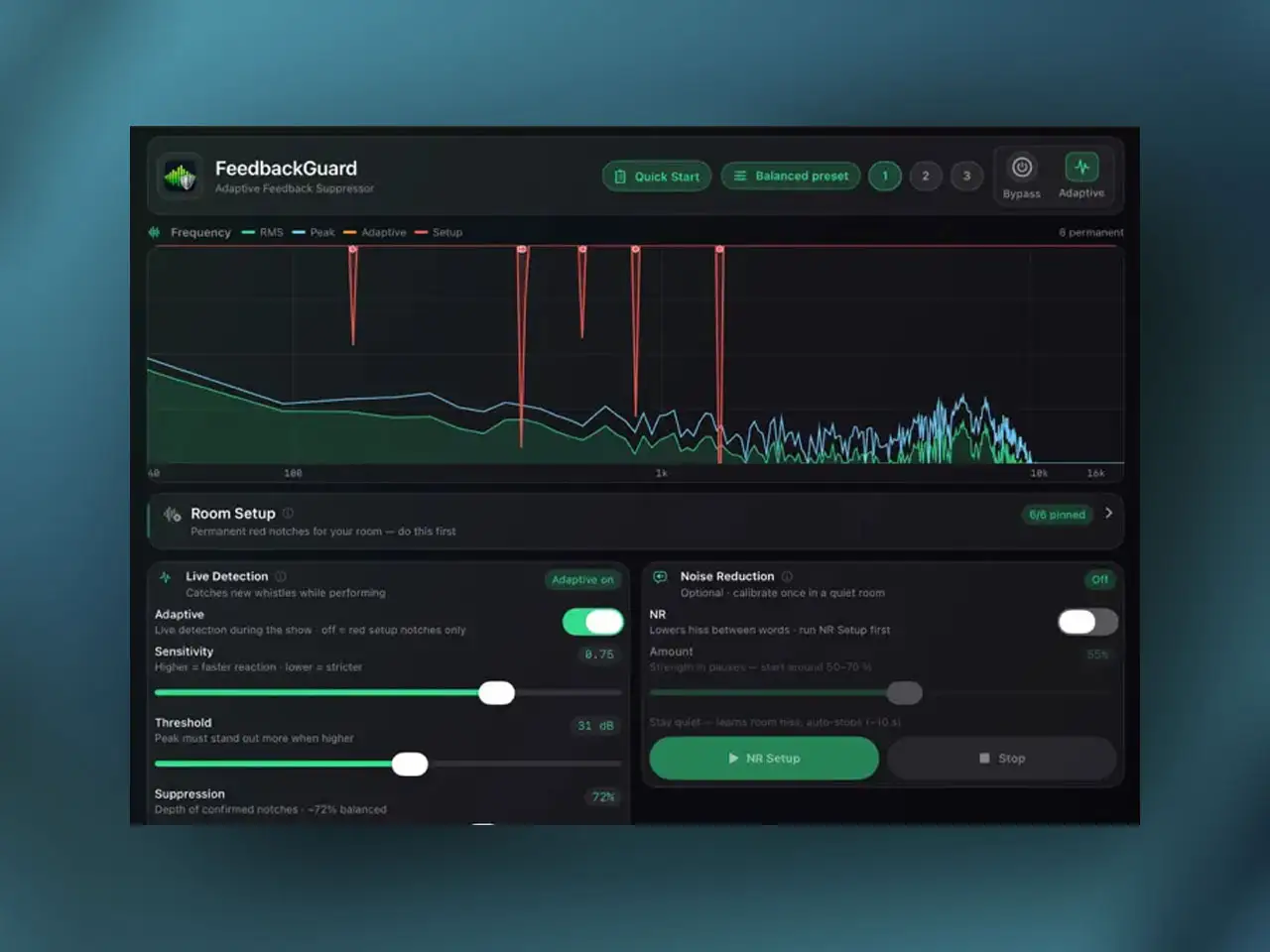
Norwin Palme has released FeedbackGuard, an AUv3 feedback suppressor for iPhone and iPad. Palme released the free ToneNoise tone and noise generator just three days earlier — FeedbackGuard is his second release this week and targets a gap that has been underserved on iOS: real-time acoustic feedback prevention for live vocal tracking, public address setups, and house of worship environments. The plugin listens to the incoming signal continuously, identifies frequencies that are growing out of control rather than naturally sustaining, and deploys targeted notch filters in milliseconds before the feedback loop fully establishes. It works as a standard `aufx` AUv3 effect in any compatible host on iOS 17.0 or later.
The Problem FeedbackGuard Is Solving
Acoustic feedback on iOS is a real workflow problem for anyone recording live vocals through a microphone with monitoring speakers active — the classic loop where the microphone picks up the speaker output, amplifies it, and the speaker produces it louder until the system screams. Standard noise gates can reduce quiet passages but don’t address feedback during a performance. EQ notches applied manually can suppress known problem frequencies but can’t respond to new feedback paths that develop as a performer moves around a room. Hardware feedback suppressors exist for live PA systems but are expensive, not portable, and don’t integrate with iOS audio routing. FeedbackGuard puts the equivalent processing inside a single AUv3 insert that travels with your session.
The same problem exists in less dramatic forms during studio tracking. A vocalist monitoring through headphones with some speaker bleed, a guitar cabinet in the same room as the microphone, or a poorly isolated monitoring setup can all produce low-level feedback that a microphone picks up intermittently. The plugin’s detection threshold calibration means you can set it sensitive enough to catch these minor feedback tendencies without triggering false positives on sustained vocal notes or room ambience.
How the Detection Works
The distinction between genuine acoustic feedback and a sustained musical note or speech element is not trivially solved. Both can produce strong, narrow peaks in the frequency spectrum. The difference is behavioral: feedback grows exponentially as the loop reinforces itself, while a vocal note or musical tone sustains at a relatively stable level or decays naturally. FeedbackGuard uses a three-stage analysis pipeline to make this distinction before applying any attenuation.
The first stage computes the Peak-to-Neighbourhood Power Ratio (PNPR) of the incoming signal. This metric evaluates how much energy is concentrated at a specific frequency compared to the surrounding frequency region — a feedback tone typically shows an extremely narrow, isolated peak rather than the broader energy distribution of a voice or instrument. The second stage is a growth verification check that tracks the power behavior of any suspicious narrow peak over a millisecond timeline. A frequency that is actively gaining energy at an accelerating rate is exhibiting feedback run-up behavior; a sustained note is not. Only frequencies that pass both the PNPR test and the growth check proceed to the third stage: parabolic peak detection, which locks onto the precise center frequency of the confirmed feedback tone using parabolic interpolation for sub-bin precision. The adaptive notch bank then deploys a narrow filter at exactly that frequency, leaving surrounding frequencies untouched.
The consequence of this three-stage approach is that the plugin rarely fires on material it shouldn’t. Adjust the Notch Threshold control upward if the plugin is triggering on sustained vocal notes or room resonances in your specific environment, or downward for more aggressive early intervention in high-feedback-risk setups. Attack Time and Release Time control how quickly notches open and close, and Suppression Depth sets how deep the notch cuts. Filter Q shapes the width of the notch — narrow Q targets the feedback frequency precisely while leaving more of the surrounding spectrum intact; wider Q sacrifices some surrounding frequency content for more robust suppression if the feedback frequency is unstable or drifting.

Up to 24 Simultaneous Notches
FeedbackGuard maintains an adaptive notch bank of up to 24 simultaneous filters. In a stable, well-controlled monitoring environment you might never see more than one or two notches active at once. In a difficult room — reflective walls, multiple open microphones, a powerful PA system — feedback can develop at several frequencies simultaneously or shift frequencies as stage conditions change. The 24-notch capacity means the plugin can handle complex multi-frequency feedback situations that would overwhelm a simpler one-or-two-notch design. Notches that are no longer needed release based on the Release Time setting as the feedback condition clears, returning those frequency regions to their original levels.
The optional Harmonic Detection Engine extends protection beyond the fundamental feedback frequency. Acoustic feedback commonly produces overtones at mathematical harmonic ratios above the fundamental — when a 500 Hz feedback tone establishes itself, you may also see energy building at 1000 Hz, 1500 Hz, and 2000 Hz. Enabling harmonic tracking causes the plugin to automatically identify and deploy secondary notches at those ratios when a fundamental feedback tone is confirmed, preventing the harmonic chain from establishing as a secondary feedback path.
Integration and Setup in iOS Hosts
In AUM, insert FeedbackGuard directly on the vocal input channel strip between the microphone input and whatever effects chain follows — the plugin should sit early in the chain before any amplification or saturation that could make feedback harder to catch. In Loopy Pro, insert it on the input track that’s feeding the live monitoring path. In Logic Pro for iPad, place it on the input channel for live tracking — the real-time spectrum analyzer shows exactly which frequencies are being targeted, making it straightforward to verify the plugin is responding correctly without guesswork.
Three quick-save preset slots provide fast recall between different setup configurations — a close-miked studio session has different threshold needs than an open PA environment. The factory Balanced preset covers general use without adjustment. Spectral noise reduction handles quiet passages when the microphone is inactive, reducing low-level noise buildup during silent gaps. Mono and stereo operation are both supported, and the sample rate range from 8 kHz to 192 kHz covers any iOS audio interface configuration without manual adjustment.
Key features:
- Three-Stage Feedback Detection: PNPR analysis, growth verification, and parabolic peak tracking — distinguishes genuine feedback run-up from sustained vocal notes, speech, and room ambience
- Adaptive Notch Bank: Up to 24 simultaneous dynamically-deployed notch filters — each deploys and releases independently as feedback conditions change
- Harmonic Detection Engine (Optional): Automatically identifies and suppresses harmonic overtones of confirmed fundamental feedback frequencies
- Real-Time Spectrum Analyzer: Visual display of active frequency spectrum with indicators showing where notches are active
- Full Parameter Control: Core Sensitivity, Notch Threshold, Suppression Depth, Filter Q, Attack Time, and Release Time — all individually adjustable
- Spectral Noise Reduction: Integrated module for low-level noise cleanup during silent or quiet passages
- 3 Quick-Save Preset Slots: Fast recall between setup configurations plus factory Balanced preset for immediate deployment
- Full Signal Bypass: Instant hardware-style bypass toggle
- Mono and stereo — 8 kHz to 192 kHz sample rate support. AUv3 (`aufx`) and Standalone on iPhone and iPad — iOS/iPadOS 17.0+
App price: $3.99
No in-app purchases.
Original release: May 23, 2026 | Latest update: May 23, 2026


