
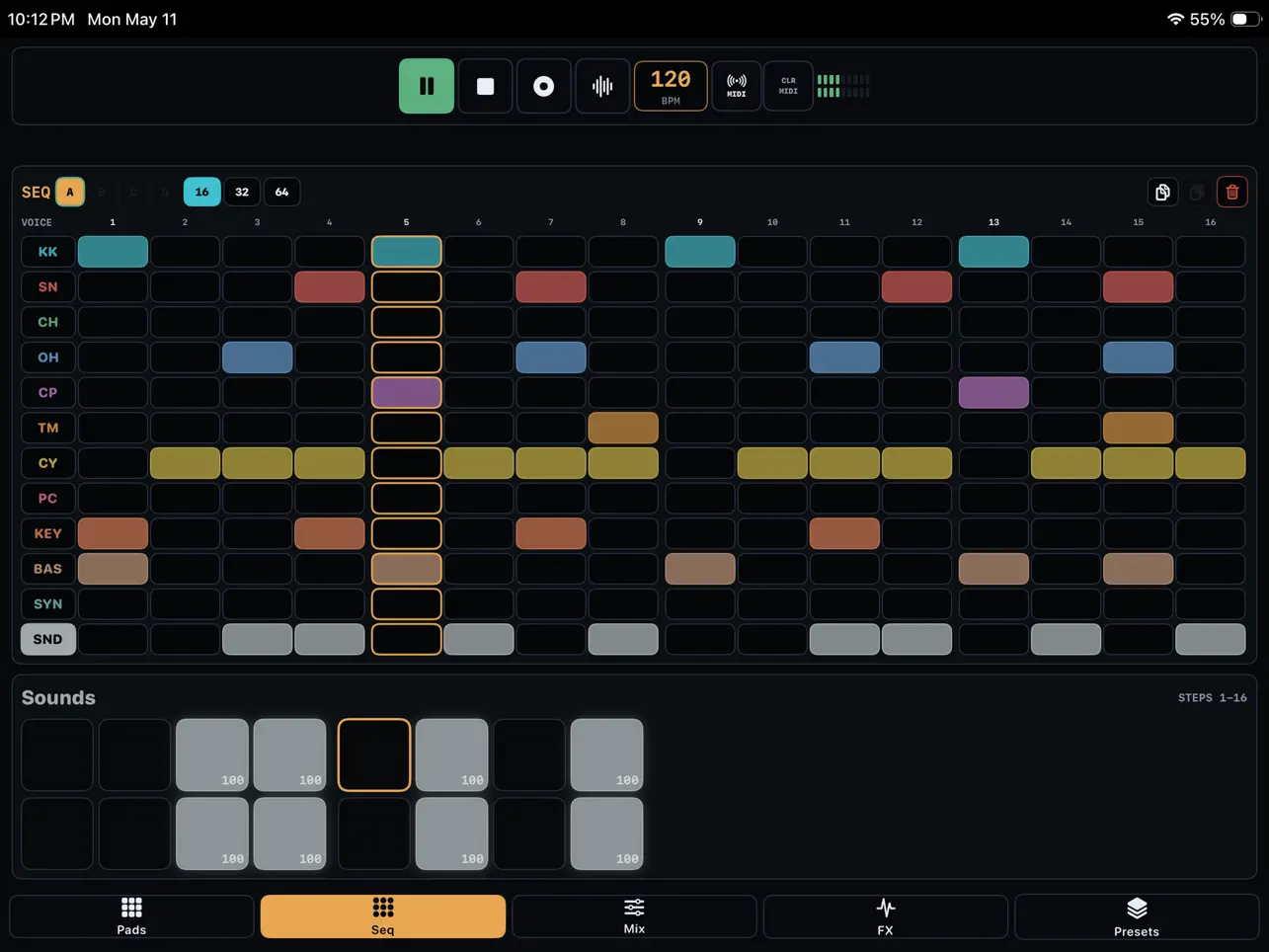
Richard Gillespie has released TEMPO-1, a 12-voice drum machine for iPhone, iPad, and Mac. Regular readers will recognize the developer name — we covered his VA-1 synthesizer at launch, which drew mixed reactions largely due to its premium pricing and initial AUv3 absence. VA-1 later received AUv3 support in v1.1, and TEMPO-1 arrives with it from day one. The feature list is substantial for a first release: 64-step sequencing with per-step probability, micro-timing, and velocity; a bounce-to-sample workflow; pattern automation; MIDI learn across every control; and full AUv3 integration. Worth examining in detail.
The 12-Voice Layout
TEMPO-1 organizes its voices into eight dedicated rhythm slots — Kick, Snare, Closed Hat, Open Hat, Clap, Tom, Cymbal, Perc — plus four additional slots for melodic and textural material: Keys, Bass, Synth, and a free-use Sounds slot. That last category is the practical one. In most iOS drum machines, adding a melodic bassline or a pad stab means routing another app alongside the drum machine, which adds latency management, routing complexity, and another layer of project overhead. Having four non-drum slots inside the drum machine itself makes sketching a complete loop — kick, bass, pad, percussion — a single-app operation. Export options then let you move it wherever it needs to go.
Every voice slot accepts user samples, not just the Sounds slot. You can import your own kicks, snares, and one-shots into any of the 12 positions and tune them natively within the app. That matters when you need a kick and bass to sit harmonically — tune the sub down to the right note and the low end locks. Modeled drums and bundled samples cover the starting point, but the architecture treats user samples as a first-class option rather than an afterthought. Preset banks embed both the samples and the MIDI mappings, so sharing a kit with a collaborator transfers the whole setup without extra file management.
The Sequencer: Where the App Earns Its Keep
The 64-step sequencer with 64 pattern slots is, on paper, competitive with established iOS drum machines. But the practical value is in the per-step controls. Micro-timing lets you nudge individual steps forward or backward from the grid — the difference between a hi-hat that sits exactly on the 16th note and one that rushes slightly ahead of the kick, which is what actually makes a groove feel propulsive rather than mechanical. Ghost notes come from velocity control per step, where a snare at 20 percent velocity blends into the pocket while a hit at full velocity cuts through. Probability sets the likelihood a step fires at all, which is where the pattern starts to move on its own — a clap that fires 70 percent of the time sounds less like a programmed sequence and more like something a drummer would play, with occasional skips that keep the listener’s ear uncertain.
Pattern automation extends these dynamics to the effects chain. You can automate the Phaser, Slicer, Delay, Reverb, Filter, and master controls within the 64 steps, meaning the effect behavior changes throughout the loop rather than sitting static. A filter that opens over eight steps on a hi-hat, or a reverb decay that lengthens on beats 13 through 16, is the kind of internal movement that used to require careful automation lane work in a DAW. Here it lives inside the pattern itself and travels with the preset.
Bounce-to-Sample and the Resampling Workflow
The bounce-to-sample workflow is one of the more interesting features and one of the oldest tricks in hardware production. Build a layered pattern using several voices and the internal effects chain. Capture that output as a WAV — either a clean loop export or a live WAV capture of the performance in real time. Load that WAV back onto a pad. Now you have a single voice that plays back everything you just built, and the other 11 voice slots are free again. Stack another layer on top. Capture again. Repeat. It’s how producers coaxed enormous depth out of samplers with only eight or twelve memory slots, and it’s genuinely useful on a phone where processing power isn’t unlimited. The constraint becomes part of the creative process.
Export options cover three cases: Loop WAV for a clean clip that drops into any DAW, Pattern MIDI for carrying the note data into Logic Pro for iPad, Ableton, or any other MIDI-aware environment, and Live WAV Capture for recording a real-time performance including any parameter movements. In AUM it runs as a standard AUv3 instrument with full routing flexibility. MIDI Learn maps pads, transport controls, BPM, FX parameters, and mixer levels to any external controller — a 16-pad controller paired with TEMPO-1 gives you a physical performance surface for triggering patterns live.
Context and Honest Assessment
TEMPO-1 enters a competitive market. Patterning 3 occupies the advanced end with its circular sequencer and deep pattern logic. VU202 covers the free end with SP-202-style sampling and 32 pads. Between those two extremes, TEMPO-1 is positioned as a focused, no-distractions drum workstation with a clean layout and a feature set that covers the workflow from initial sketch to DAW handoff. The community reaction on the Loopy Pro forum at launch was mixed — some users flagged the app as AI-generated based on the style of the App Store copy and the developer’s pattern of rapid releases across categories. Whether that characterization affects sound quality or workflow utility is something each user needs to assess. The feature list itself — confirmed from the developer’s forum post — is real and coherent.
The honest comparison point is price relative to what’s already available. TEMPO-1 is priced at $9.99 which puts it in the mid tier, it sits alongside apps with longer track records and deeper community validation. But it offers an intriguing combination of AUv3, the resampling workflow, per-step probability, micro-timing, pattern automation, and universal support for Mac, iPhone, and iPad. This makes it a reasonable value proposition for producers seeking a self-contained drum machine that seamlessly integrates with their existing setup.
Key features:
- 12-Voice Drum Workstation: Eight rhythm voices (Kick, Snare, Closed Hat, Open Hat, Clap, Tom, Cymbal, Perc) plus Keys, Bass, Synth, and Sounds — all accept user samples
- 64-Step Sequencer: 64 pattern slots, per-step velocity, probability, and micro-timing — tight machine pulse through loose humanized swing in the same grid
- Pattern Automation: Automate voice, mixer, FX (Phaser, Slicer, Delay, Reverb, Filter), delay time, and master controls within the 64-step pattern
- Bounce-to-Sample / Resampling: Capture any voice or output as WAV and reload it on a pad to build new layers on top
- User Sample Import: Every voice slot accepts imported samples with native tuning per voice
- Modeled Drums and Bundled Samples: Factory kits and starter patterns included alongside the user sample workflow
- Mixer: Per-voice level, pan, mute, solo, master level, and meters
- Integrated Effects: Phaser, Slicer, Delay, Reverb, Filter, and Master controls — all automatable within the pattern
- MIDI Learn: Map pads, transport, mixer, BPM, FX, routing, and continuous controls to any external MIDI controller
- Three Export Formats: Loop WAV export, Pattern MIDI export, and Live WAV Capture for real-time performance recording
- Preset Banks: Preset-bank import/export with embedded samples and MIDI mappings for easy sharing
- AUv3: Full plugin integration in AUM, Logic Pro for iPad, Loopy Pro, or any AUv3 host
- Universal: iPhone, iPad, and Mac — requires iOS/iPadOS/macOS 17.0+
App price: $9.99
No in-app purchases.
Original release: May 13, 2026 | Latest update: May 13, 2026


