
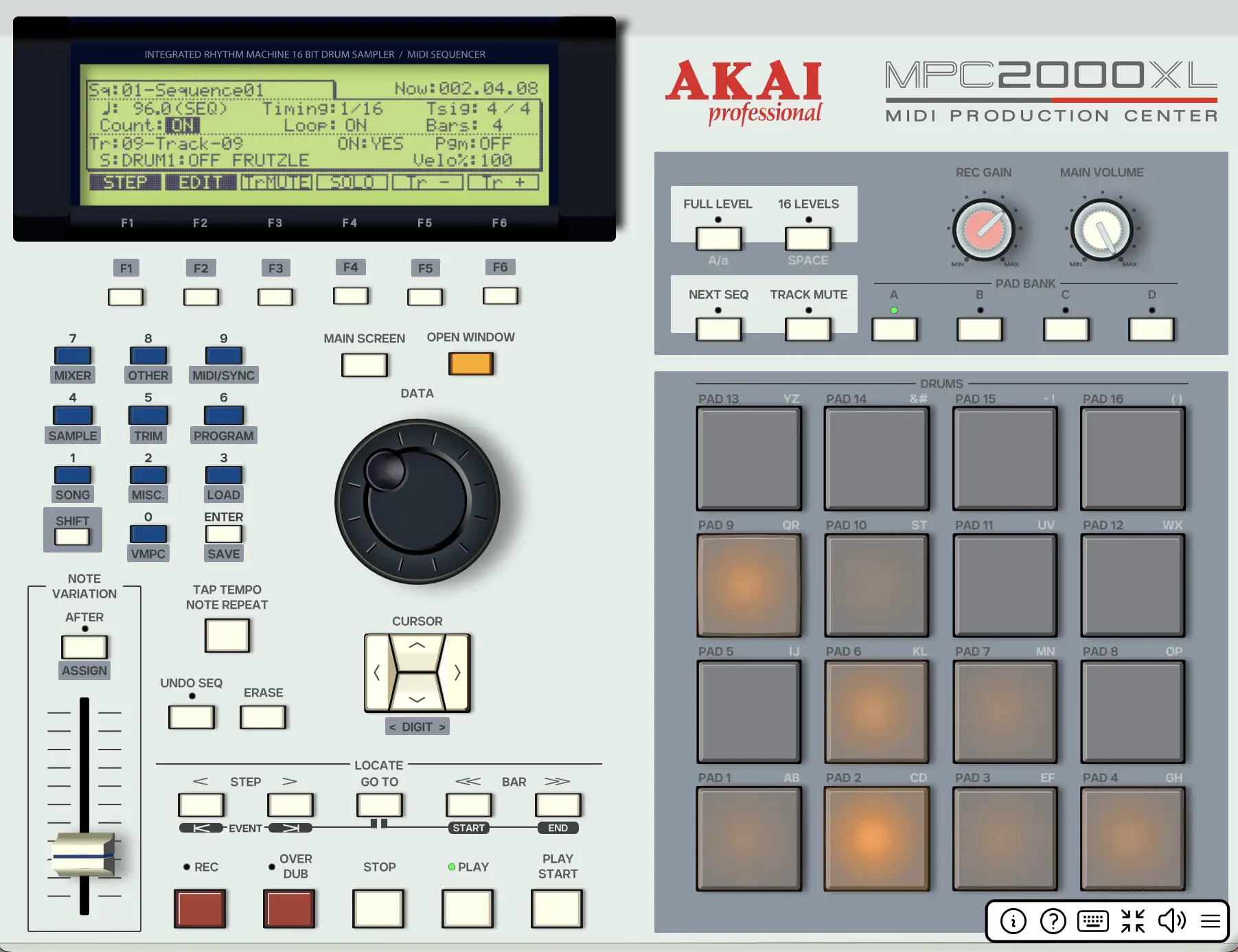
Developer Izmar Verhage has been running a public TestFlight beta of VMPC2000XL for iPad since mid-2024, with the most recent update landing in January 2026 adding improved extended MIDI control. VMPC2000XL is a free, open-source (GPL3) emulator of the Akai MPC2000XL hardware sampler and sequencer — the 1999 machine whose workflow became foundational for a generation of hip-hop producers. The iOS version operates as a standalone app and AUv3 instrument plugin on iPad, runs on both Mac (AU/VST3/LV2) and Windows and Linux on desktop, and carries no in-app purchases, no subscription, and no license fee. It will launch free when it eventually reaches the App Store. No release date has been set.
Before getting into the features, one practical detail the TestFlight listing doesn’t state prominently: the iOS version currently only runs on iPad. The developer has been explicit about this in his own documentation — the MPC2000XL’s physical hardware has a dense button layout and small LCD screen that translates to an interface too cramped for iPhone-sized displays. The emulator mirrors that hardware layout precisely, so the same density problem carries over. iPhone support is not planned in the near term. If you’re looking to run this on an iPhone, wait for a future update rather than joining the beta expecting it to work on a smaller screen.
What VMPC2000XL Is and Why It Exists
The Akai MPC2000XL was a dedicated hardware instrument: a 64-track sequencer, a sample-based drum machine, and a MIDI production center in a single unit. Its workflow was self-contained and deliberate — you navigated menus with a jog wheel and buttons, assigned samples to pads via PGM files, built sequences in a grid that reflected the hardware’s physical architecture, and exported your work in proprietary file formats that only MPC hardware could read. That specific workflow — its constraints, its rhythm, its particular way of forcing you to think about sample placement and sequence structure — is what VMPC2000XL recreates.
Verhage has reverse-engineered over 100 LCD menu screens to pixel accuracy. Knowledge from the hardware transfers directly to the software — if you know how to navigate the MPC2000XL in the physical world, you know how to navigate VMPC2000XL on an iPad. That fidelity is the point. It’s not an MPC-inspired tool with a modern interface; it’s the original interface, in software, on a touchscreen.
File Compatibility: Actual Hardware Exchange
VMPC2000XL reads and writes the original Akai MPC2000XL file formats directly. The supported types — `.SND` and `.WAV` for individual samples, `.PGM` for pad assignment programs, `.MID` and `.ALL` for sequence data and song structures, `.APS` for complete session files — are identical to what physical MPC2000XL hardware uses. Raw USB volume (CF card) support uses Akai FAT16 filenames for direct data exchange.
The practical consequence is genuine hardware-to-iPad interoperability. Start a beat on a physical MPC2000XL, copy the project files to a CF card, plug an adapter into the iPad’s USB-C port, and open the exact project structure in VMPC2000XL on iPad — pad assignments, sequences, sample mappings, and song structure intact. Run the session on iPad, export it back to the card, and load it on the hardware. For producers who own physical MPC2000XL units and want to work on projects away from the studio without losing fidelity to the original session data, this is the only tool that enables that specific workflow.
Multi-Track Bouncing Without Real-Time Recording
Getting individual elements out of a physical MPC2000XL required an 8-output expander board and multiple real-time passes — you’d play the sequence through, record one set of outputs to your recorder, then repeat for each stem grouping. VMPC2000XL includes an offline multi-track direct-to-disk recording utility that renders individual instrument stems to WAV files without real-time playback. Set up the sequence, trigger the bounce, and the stems are written to disk in seconds. Those WAV files then pull into any linear DAW for mixing without the physical infrastructure the hardware required.
In AUM, VMPC2000XL loads as an AUv3 instrument. The AUv3 format means VMPC2000XL’s audio output routes into AUM’s mixer alongside other instruments in the session — you can sequence drums in VMPC2000XL and mix them against synths from other AUv3 instruments in the same AUM session. In Cubasis it drops onto an instrument track with the standard AUv3 integration.
What the Emulator Does and Does Not Do
The developer is transparent about the boundaries of the emulation. VMPC2000XL recreates the workflow — every command, shift function, track configuration screen, and pad mapping layout works as it did on the 1999 hardware. It does not model the analog input transformers or output circuitry of the physical machine, which means it doesn’t automatically add saturation, warmth, or the pre-converter grit that physical MPC2000XL recordings carry. Samples going through VMPC2000XL sound like they’re being processed by accurate digital circuitry, not analog hardware. If you want that analog coloration, it needs to come from a separate saturation plugin applied downstream. The optional EB16 multi-effects expansion board that many hardware owners added is also not emulated. The per-voice filter is an approximation calibrated by ear to mimic the original Akai chip’s behavior — it’s close, but the developer acknowledges it likely doesn’t match the hardware exactly at every setting.
The iOS beta is currently version 0.9.x — the developer’s own notes describe it as near-beta stage for iOS. It’s stable enough for regular use sessions but bugs and edge cases are still being addressed. Bug reports via TestFlight directly are how the project improves toward App Store release.
How to Access the Beta
Install TestFlight from the App Store, then open the public beta invitation link at testflight.apple.com/join/yEgfYk21. The beta provides both the standalone app and the AUv3 instrument plugin. Full documentation, file format guides, and workflow references are available at vmpcdocs.izmar.nl.
Key features:
- Pixel-Accurate MPC2000XL Emulation: Over 100 LCD menu screens recreated at hardware accuracy — existing hardware knowledge transfers directly
- 64-Track Sequencer: 99 sequences in memory, matching the original hardware architecture
- 32 Voices / 256 Sounds: Full voice capacity matching the physical MPC2000XL
- Per-Voice Filter: Ear-calibrated approximation of the original Akai digital filter chip
- Native File Format Support: Reads and writes APS, ALL, PGM, SND, MID, WAV — direct exchange with physical MPC2000XL hardware via CF card
- Raw USB Volume Support: Akai FAT16 filenames for direct hardware data exchange via CF card reader
- Offline Multi-Track Bouncing: Direct-to-disk WAV stem rendering without real-time recording passes
- Extended MIDI Control: MIDI input/output with custom mapping presets and configurable CC/note thresholds (improved in January 2026 update)
- iPad Only (iOS beta) — iPhone display is too small for the hardware-accurate UI. AUv3 instrument and Standalone on iPad
- Desktop: Standalone, VST3, AU, LV2 for Mac, Windows, and Linux — all free, no IAP, GPL3 licensed
App price: Free. No in-app purchases. Open source (GPL3).


Leave a Reply