
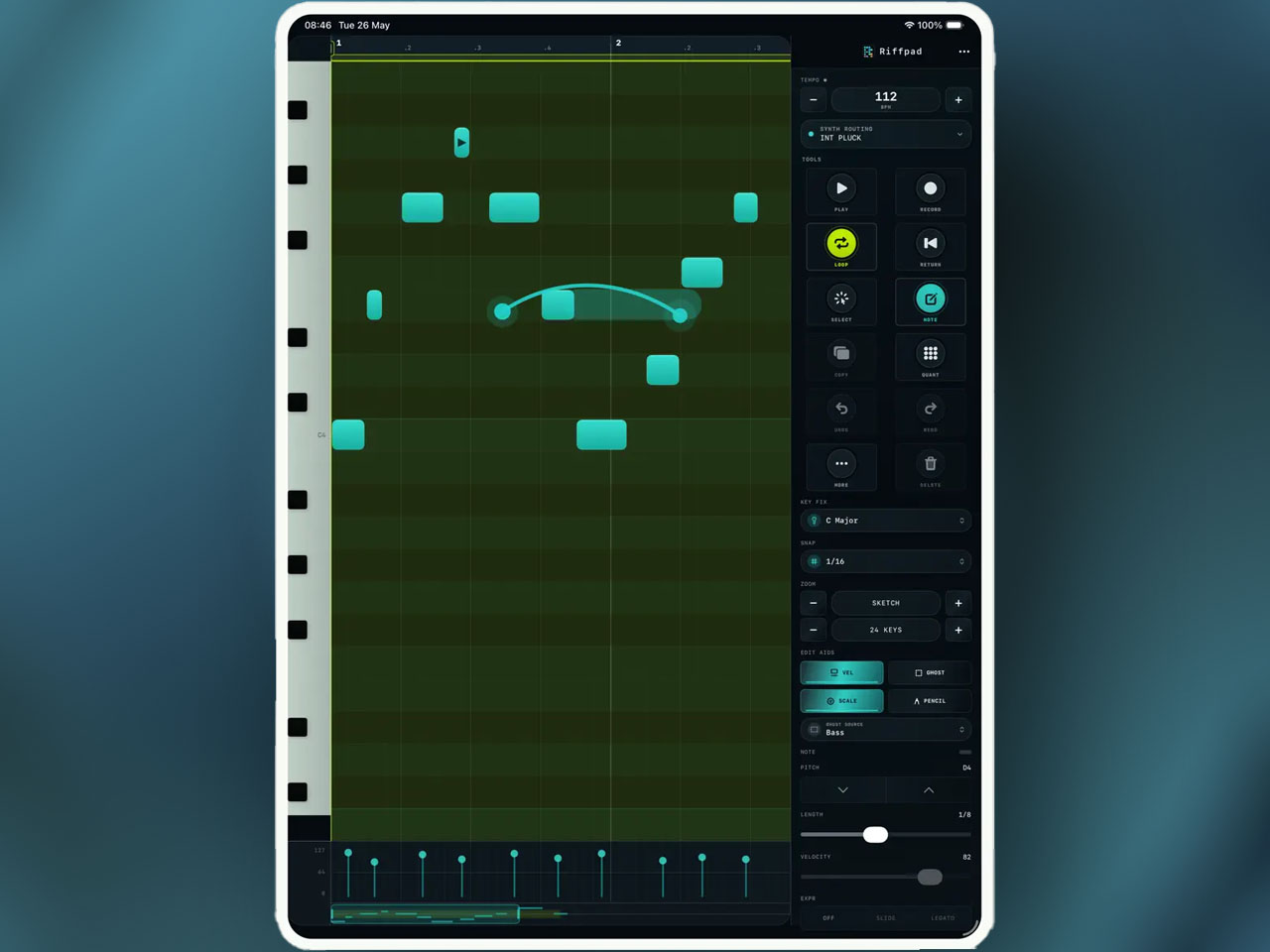
There is a specific moment in mobile music production that every iOS producer knows: you have a melodic idea, you are not near a full setup, and you need to get it captured before it evaporates. Every tool that could handle it comes with friction. Open a DAW and you are navigating project templates. Use a piano app and you capture audio but not the note data. Launch a step sequencer and you are fighting a grid that was not designed for melodic lines. Riffpad by Paul Glenn Vernon is a direct answer to that specific problem. It is a touch-first piano roll — optimized for thumbs, deliberately narrow in scope, weighing 3.4MB — that lets you draw a melody, loop it, adjust the tempo, and either play it through an AUv3 instrument loaded inside the app or send it out over Core MIDI to whatever gear you have connected. Nothing more than that, and nothing less. The “thumb-first” framing in the App Store description is not a marketing phrase; it is a design constraint that shaped every decision in the interface. On a standard desktop piano roll, note entry is a mouse-and-keyboard operation. On Riffpad the entire editing surface is built around finger-sized touch targets, single-gesture note placement, and controls that stay reachable from a standard two-thumb grip on an iPhone or iPad in either orientation.
The editing vocabulary covers what you actually need for fast melodic capture and nothing you would need to stop and configure. Place a note by tapping the grid. Move it by dragging. Resize it at the edge. Copy, paste, and delete work as expected. Scale highlighting shows the in-key pitches in a different color, so even producers who do not think in terms of note names can stay diatonic without counting intervals. Snap and quantize controls keep the rhythm tight on entry without requiring manual correction after the fact. The looping system is simple: set a loop length, adjust the tempo, and the pattern repeats immediately so you can evaluate how the melody works in rhythm before committing anything to a DAW. Live input recording is also available, meaning you can play notes in from a connected MIDI keyboard rather than drawing them — useful when the melody is clearer in your hands than it is in your head. The overall philosophy is minimum steps from idea to hearing it back. On an iPhone, where DAW interfaces typically require significant scrolling and zooming just to see what you are working on, Riffpad stays usable at normal viewing size without any display management. That is harder to achieve than it sounds, and the 3.4MB app size signals that Paul Glenn Vernon stripped out everything that was not essential to that specific workflow.
There are two ways to get sound out of Riffpad: load an AUv3 instrument inside it, or send MIDI out to external gear or software via Core MIDI. The internal AUv3 hosting means you can use any compatible instrument plugin directly within Riffpad’s session — load a synth, sketch a bassline over it, hear the result in context without leaving the app. This is the right approach for a self-contained sketching workflow: you stay in one place, hear the idea properly voiced, and decide whether it is worth developing further. For producers who want to move the sketch into a larger session, Core MIDI output sends to anything connected via USB or Bluetooth MIDI, and the iOS share sheet exports MIDI files directly to Logic Pro for iPad, Cubasis 3, or any app that accepts MIDI file import. The pattern import function works in the opposite direction — bring an existing MIDI sketch into Riffpad to continue developing it in the focused editing environment before exporting again. This round-trip makes Riffpad usable as a dedicated melody-editing view within a broader production workflow rather than just a capture tool.
Riffpad does not load as an AUv3 plugin itself
The practical limitation that the Loopy Pro community flagged immediately: Riffpad does not load as an AUv3 plugin itself. It is standalone only. You cannot open it as a MIDI generator inside AUM or Loopy Pro the way you would with a plugin sequencer. If your workflow is built around keeping everything inside an existing AUv3 host, Riffpad sits outside that chain rather than inside it. For producers who work from a single host app and rarely leave it, this is a genuine friction point. For producers who already treat iOS as a multi-app environment — sketching in one tool, developing in another, exporting between them — it fits naturally. The community comparison to Atom 2 (Bit Sonix’s more fully-featured piano roll, which does load as an AUv3) is fair: Riffpad is narrower in scope, simpler to operate, and specifically suited for capture speed rather than deep in-session editing. Whether that trade-off works depends entirely on what you actually need from a mobile piano roll.
The privacy stance is worth noting specifically because it is unusual. Riffpad collects no data, has no accounts, no cloud sync, no analytics, no tracking SDKs, and no ads. Patterns stay on the device. This is not a default position for music apps in 2026, where cloud sync and usage analytics have become standard features even in simple utilities, and it is a deliberate choice by a developer who clearly values the offline, focused workflow this app is designed to support. At $5.99 with no in-app purchases and a minimum iOS requirement of 17.0, Riffpad is a clean, well-scoped tool from an indie developer working in a space that has room for more focused alternatives to the full-DAW piano roll. It will not replace a DAW’s sequencer for producers who need deep editing. But as a fast capture and light editing environment that stays out of your way until you need it, it earns its place on the home screen.
Key features:
- Thumb-First Piano Roll: Touch-optimized note grid designed for finger-sized targets and two-thumb operation on iPhone and iPad — no stylus or external keyboard required for fast note entry
- Full Note Editing Gestures: Place, move, resize, copy, paste, and delete notes entirely through touch — no mode switching required
- Scale Highlighting, Snap, and Quantize: In-key note display, rhythm snapping, and post-entry quantize to keep melodies in tune and in time without manual correction
- Loop Playback and Tempo Control: Loop short patterns immediately to evaluate melodic ideas in rhythm before export
- Live MIDI Input Recording: Record notes in real time from a connected MIDI keyboard rather than drawing them
- Internal AUv3 Instrument Hosting: Load AUv3 instrument plugins inside Riffpad to hear sketches properly voiced without leaving the app
- Core MIDI Input/Output: Connect USB or Bluetooth MIDI devices for hardware keyboard input and send patterns to external MIDI gear or software
- MIDI File Export and Import: Export sketches via iOS share sheet to any DAW; import existing MIDI files to continue development in Riffpad’s focused editor
- Zero Data Collection: No accounts, no cloud sync, no analytics, no tracking SDKs, no ads — patterns stored locally only
- Standalone on iPhone and iPad — not an AUv3 plugin. iOS 17.0 minimum.
App price: $5.99. No in-app purchases.
Original release: June 9, 2026 | Latest update: June 9, 2026


