
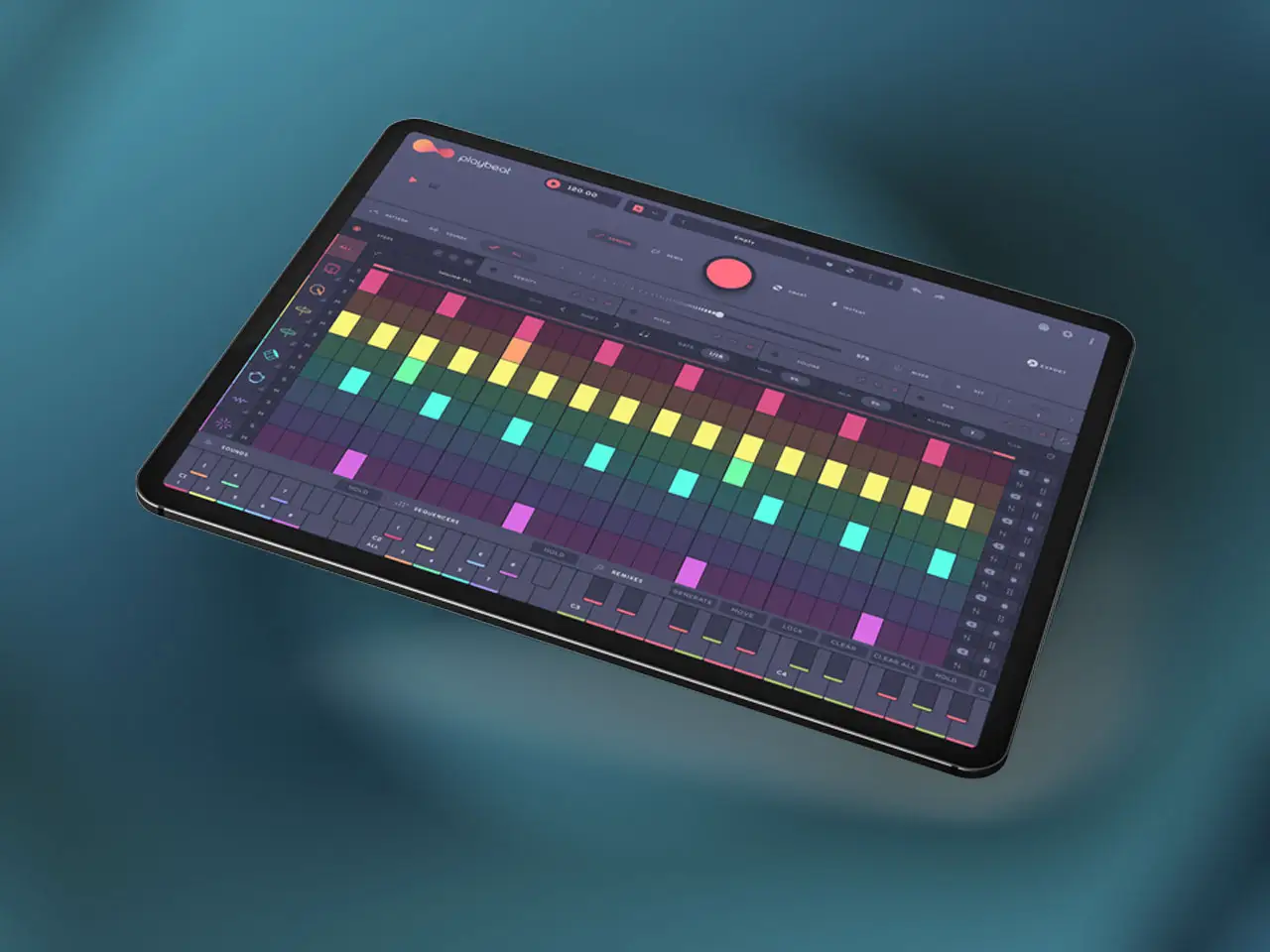
Audiomodern has released Playbeat 4 v4.2.0, adding an integrated Audio FX System to their algorithmic drum sequencer alongside a set of iOS-specific storage and workflow improvements. The update is free for all existing Playbeat 4 owners. New customers can use the coupon code PLAYBEAT30 at the Audiomodern store for 30% off until June 11, 2026. Playbeat 4 originally launched in March 2025 as primarily a desktop plugin (VST3, AU, AAX) that also ran as an AUv3 on iPad. Version 4.2.0 continues the pattern of adding functionality across both platforms simultaneously, though the iOS implementation deserves a direct assessment before getting into the feature details.
A Word on the iPad Experience First
Playbeat is marketed prominently as “the ultimate feature-packed drum designer for iPad” on Audiomodern’s own product page, and the iPad version is a genuine full-featured port with the complete algorithm set intact. But producers considering this for iPad-first use should know that the interface was designed for desktop monitors and adapted to iPad rather than built natively for touch. On an iPad Pro 12.9-inch or 13-inch M4, the dense control layout is manageable — knobs are small but functional, and the color-coded eight-lane grid is readable. On anything smaller than 11 inches, the interface becomes genuinely difficult to use in a performance or production context. Controls that are two or three pixels wide on an 11-inch screen, hover states designed for mouse precision, and text labels that require zooming in to read are consistent community feedback points for Playbeat on smaller iPads. If you’re running a 12.9-inch or 13-inch Pro, this is a non-issue. On an iPad mini or standard iPad, it’s worth watching a video of the iOS version specifically before purchasing. The algorithm and sound quality are not in question — the interface ergonomics on smaller screens are.
What’s New in v4.2.0
The headlining addition is the Audio FX System, which integrates effects processing directly into the sequencer lanes rather than requiring external routing. Prior to this update, Playbeat’s output was essentially a clean audio or MIDI signal that you processed downstream in your host. Now you can apply modulation effects, spatial processing, and depth controls within individual lanes or across the master mix without breaking out to separate AUv3 inserts in AUM or elsewhere. The specific effects included — the types of modulators, the reverb character, the FX architecture — were not detailed in Audiomodern’s public release notes beyond “FX Section.” Check the official walkthrough video for the full breakdown before forming expectations.
The iOS-specific improvements in this update are more concrete. Library transfer now works with external iPad storage drives — copy your custom libraries and user presets to an external SSD connected via USB-C and access them from Playbeat without keeping everything in on-device storage. This is a meaningful addition given that the full asset library can reach 10 GB. The sample browser now keeps missing file paths visible but greyed out when the source directory has been moved or deleted, which preserves the visual structure of a project even when source files are offline. Previously, missing samples would silently break the project display. A cache management tool handles clearing old audio loops pre-exported to local storage — useful for freeing device space after a production session where you exported multiple stems. Dragging a folder into a sample lane now loads a random sample from that folder automatically rather than requiring you to drill into the folder and pick a file. Pack thumbnails appear in the master preset manager for faster visual navigation. The IAP tab has been improved, and a Library Reset action is available in settings.
Two stability fixes matter for production use: a crash caused by deselecting a favorite or Smart preset is resolved, and standalone mode now clears previous MIDI output locks on restart, which was causing stuck MIDI notes in certain setups when relaunching the app mid-session.
What Playbeat 4 Is
For readers who haven’t encountered it before: Playbeat 4 is an algorithmic drum sequencer that generates patterns using on-device AI. The core idea is that instead of programming beats manually or dragging loops from a sample browser, you point the engine at a genre style and a complexity level and it builds patterns from your samples. Eight independent sequencer lanes run simultaneously, each controlling a different drum voice. The randomization works across four modes. Random builds complex variations without structural constraints. Remix analyzes your current active pattern and generates variations that preserve the core groove identity — useful for building fills and transitions from an existing loop rather than starting fresh. Smart Mode draws from patterns you’ve previously flagged as “Smart Presets,” building new rhythms in the style of work you’ve already approved. Instant Mode triggers temporary pattern changes only while the button is held — release it and the pattern returns, which is useful for live variations during a take.
The Genre Blending Matrix is one of the more distinctive features: 35 algorithmic genre styles (Techno, Trap, House, Breakbeat, and 31 others) can be blended in combinations of up to three simultaneously. Selecting 60 percent Techno, 30 percent House, and 10 percent Jazz and hitting generate gives you something the algorithm wouldn’t produce from a single genre selection. Each of the eight lanes has independent control over step distribution, density (for rapid ratchets and double-hits within a single step), real-time pitch shifting, volume, pan, flam, and track delay for off-grid swing. Infinity Mode automatically generates a new sequence after a chosen number of loop cycles, producing an evolving drum line for long-form ambient or generative use. A four-octave performance keyboard triggers variations and stores up to 24 complete patterns for live switching.
In Loopy Pro, Playbeat runs as both an AUv3 Instrument and an AUv3 MIDI FX, letting you use its pattern generation to drive other synths in the same session rather than using its internal sounds. In Logic Pro for iPad, the MIDI FX variant inserts on a software instrument track and sends generated patterns to whatever plugin is loaded on that track. Pack Creator lets you bundle custom samples, presets, artwork, and metadata into exportable packs that transfer between iOS and desktop.
New in Version 4.2.0
- Audio FX System: Integrated effects processing directly in sequencer lanes and master mix — no external routing required
- iOS Library Transfer: Full support for transferring libraries and custom user presets to external iPad storage drives via USB-C
- Improved External Storage Support: Better handling of samples and presets stored on external drives
- Sample Browser Resiliency: Missing sample paths and deleted external directories remain visible but greyed out — project display remains intact
- Cache Management: Tools to purge old exported audio loops and free local storage
- Folder Drag-to-Lane: Dragging a folder into a sample lane now auto-loads a random sample from that folder
- Pack Thumbnails: Visual thumbnails added to the master preset manager for faster navigation
- Remix Key Highlight: UI now maintains the highlight state of the currently selected remix key
- IAP Tab Improvements: Improved in-app purchase tab on iOS
- Library Reset: New Library Reset action available in settings
- Fix — Smart Preset Crash: Resolved a crash caused by deselecting a favorite or Smart preset
- Fix — MIDI Output Lock: Standalone mode now clears previous MIDI output locks on system restart — eliminates stuck MIDI notes when relaunching
Core App Features
- On-Device AI Pattern Generation: No internet required — all algorithms run locally on the device
- Four Randomization Modes: Random, Remix (groove-preserving variations), Smart (draws from flagged presets), Instant (temporary change while held)
- Eight Independent Sequencer Lanes: Per-lane control over Steps, Density, Pitch (with scale/tuning support), Volume, Pan, Flam, and Track Delay
- Genre Blending Matrix: 35 genre styles blendable in combinations of up to three simultaneously
- Infinity Mode: Auto-generates new sequence after a chosen number of loop cycles for continuous evolving drum lines
- Performance Keyboard: Four-octave layout for triggering variations and storing up to 24 complete patterns live
- Multi-Output Stem Export: Audio and MIDI stem export per lane
- Pack Creator: Build exportable sample and preset packs with artwork and metadata — transfers between iOS and desktop
- AUv3 Instrument and AUv3 MIDI FX on iOS; VST3, AU, AAX, Standalone on Mac and Windows — requires iOS 14.0+
App price: Free
In-app purchases: $19.99 (Unlock all features). $9.99 Extra content: Voltage, Knock, Orion and Exodus.
Original release: March 7, 2025 | Latest update: May 21, 2026 (v4.2.0)


