
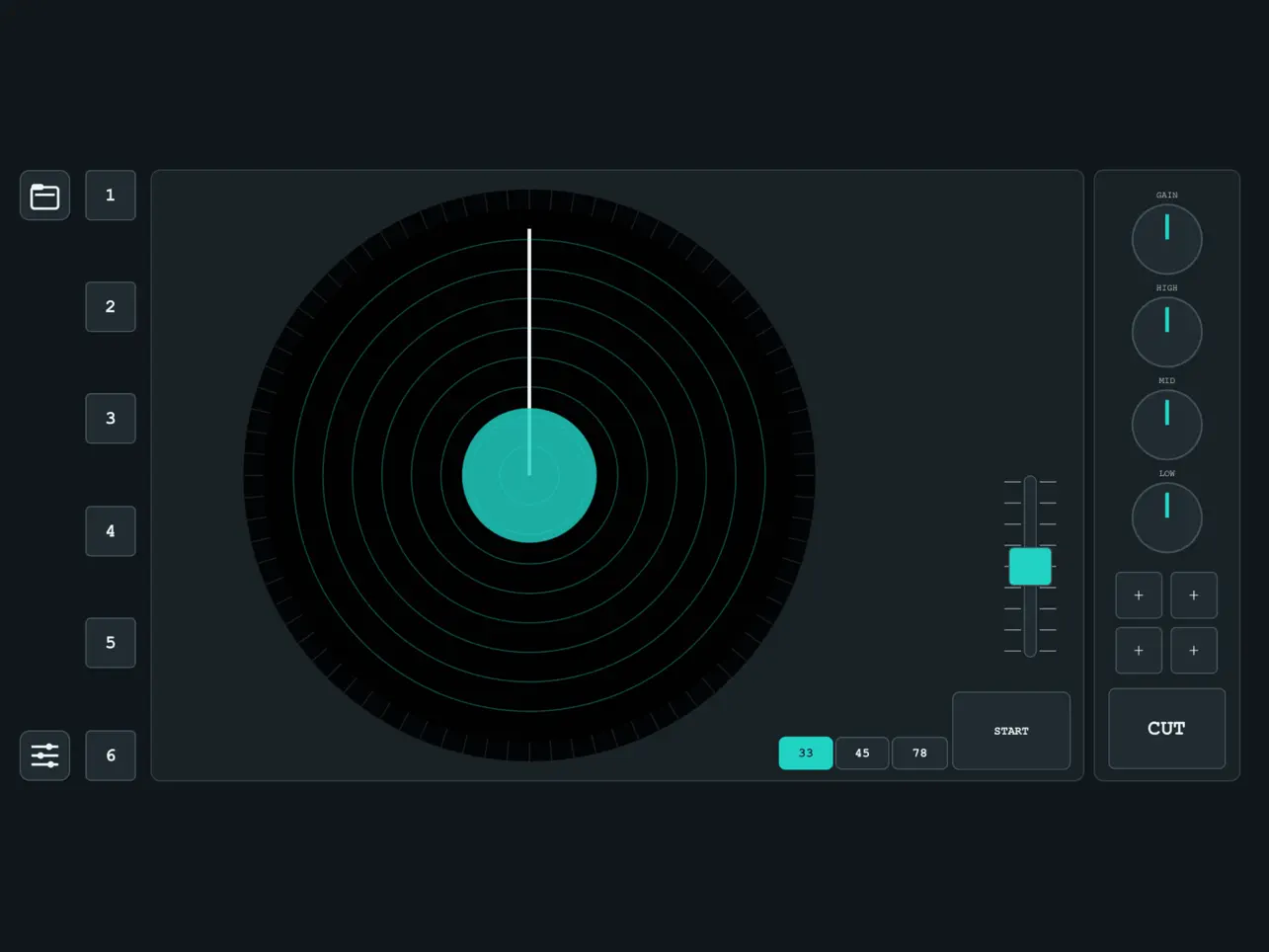
The standard way to find a sample on an iPhone or iPad involves staring at a waveform: scrolling through a flat visual representation of audio, zooming in to see transients, selecting a region, and auditioning it. VU44-7 by Dariusz Chynek — the developer behind VU202 and VU950 — proposes a different approach. Instead of looking at the audio, you play it back on a virtual turntable platter and catch what you want by feel and ear, the way producers worked when records were the source material and there was no waveform to look at. The idea is not new — hardware samplers with vinyl playback have existed for decades — but VU44-7 is the first implementation of this specific workflow as a free, standalone-plus-AUv3 iOS app, and it is more considered than a simple gimmick. The platter, the EQ, the cue points, and the FX rack all come from the same design philosophy: get producers interacting with sound physically rather than visually.
The platter itself is the whole experience. Spin it to play, scrub it by hand to rewind and preview, scratch across it to create rhythmic cuts, and nudge it with a finger to drift the pitch without stopping playback. RPM switching between 33, 45, and 78 is a one-tap pitch shift — 78 runs a record significantly faster and higher than 33, and using that difference to repitch samples mid-session is a functional technique, not just an aesthetic touch. The CUT & START mode enables transform-style cuts: hold and release for gated stabs, the same motion that defines scratch-style sample manipulation on hardware. Six hot-cue memory points let you mark positions on the platter and trigger them instantly — drop a needle on a clean break, drop it again on a chord stab, return to either point on demand without rewinding manually. The philosophy the developer uses in the marketing copy — “stop scrolling waveforms, start digging” — is an accurate description of the core difference between this and every other file browser on iOS. Whether that difference translates to faster, more musical sample selection is personal, but the interface at least makes the case.
The signal chain added to the platter is genuinely useful rather than cosmetic. A 4-band channel strip (Gain, High, Mid, Low) sits directly in the playback path — roll off the low end of a vocal sample before it hits your sampler, push the mids on a thin horn stab, dial back the highs on something too bright. This is the kind of filter-and-tone shaping that producers who work with raw vinyl samples do instinctively on hardware, and having it between the platter and the output matters. Beneath the channel strip are four insert slots loaded from a library of 16 effects derived from the VU950 engine — filters, compression, delays, reverb — allowing you to treat and color the audio before it leaves the app. The DISK browser handles source loading, supporting folders, individual audio files, and video files, which means YouTube downloads and screen recordings are viable sample sources alongside audio files. A cosmetic choice: the UI can be skinned between a VU950-style look and a modern layout.
Loading VU44-7 as an AUv3 plugin inside AUM or Loopy Pro routes its audio output into the host, where you can run a recording channel alongside it and capture whatever comes off the platter — a bounce, a scratched loop, a cue-point trigger. Multiple instances work simultaneously, so you can run two independent platter sessions side by side and route them to different recording channels. Here is the precise limitation that the Loopy Pro community flagged at launch: VU44-7 loads as an AUv3 audio source, not as an AUv3 audio effect. That means you cannot send audio from another app through the platter’s processing chain within a host — it only generates audio from the files you load into it. For producers who want to use the EQ and FX rack as an insert effect on a live audio stream from another app, that workflow is not available, and the developer has confirmed this is a deliberate decision with no plans to change it. A separate bug reported at launch: the AUv3 UI froze and became unresponsive on some devices immediately after loading. A delete-and-reinstall reportedly resolved it temporarily, but the issue was reported to the developer and likely being addressed.
One note on the privacy claim: VU44-7 bills itself as having no accounts, no analytics, and no tracking. That is Apple’s standard developer declaration and appears accurate for this app. At least one community member raised the observation that this developer’s other apps reportedly include analytics code — worth knowing if the no-tracking claim is a decisive factor for you, though the specific claim for VU44-7 itself has not been challenged. At free with no in-app purchases, the price removes the risk from trying it regardless of where you land on that question. For producers who sample from files rather than live audio streams, the AUv3 limitation is largely irrelevant, and the platter-plus-cue-points-plus-EQ workflow is a genuinely fresh way to interact with source material on a touchscreen.
Key features:
- Tactile Vinyl Platter: Multi-touch turntable simulation — scratch, nudge, rewind, and spin by hand to interact with audio physically rather than visually
- 33 / 45 / 78 RPM Switching: One-tap playback speed and pitch change for instant sample pitch-flipping
- CUT & START Mode: Gate the playback for transform-style cuts and rhythmic stabs
- 6 Hot-Cue Memory Points: Mark and recall positions on the platter instantly without manual rewinding
- 4-Band Channel Strip: Gain, High, Mid, Low — shape the tone of the source before it reaches your sampler
- 16 VU950 Effects Across 4 Insert Slots: Filters, compression, delays, and reverb drawn from the VU950 engine for in-path processing
- DISK Browser: Load from folders, audio files, and video files — including YouTube downloads
- AUv3 Audio Source: Loads as an AUv3 instrument plugin in AUM, Loopy Pro, and other compatible hosts — routes platter audio directly into recording channels. Multiple instances supported. Note: does NOT function as an AUv3 audio effect (cannot process audio from other apps through it)
- UI Skins: VU950 or Modern visual theme
- Standalone and AUv3 on iPhone and iPad. Free, no in-app purchases. No accounts, no analytics declared.
App price: Free. No in-app purchases.
Original release: June 21, 2026 | Latest update: June 21, 2026


Leave a Reply