
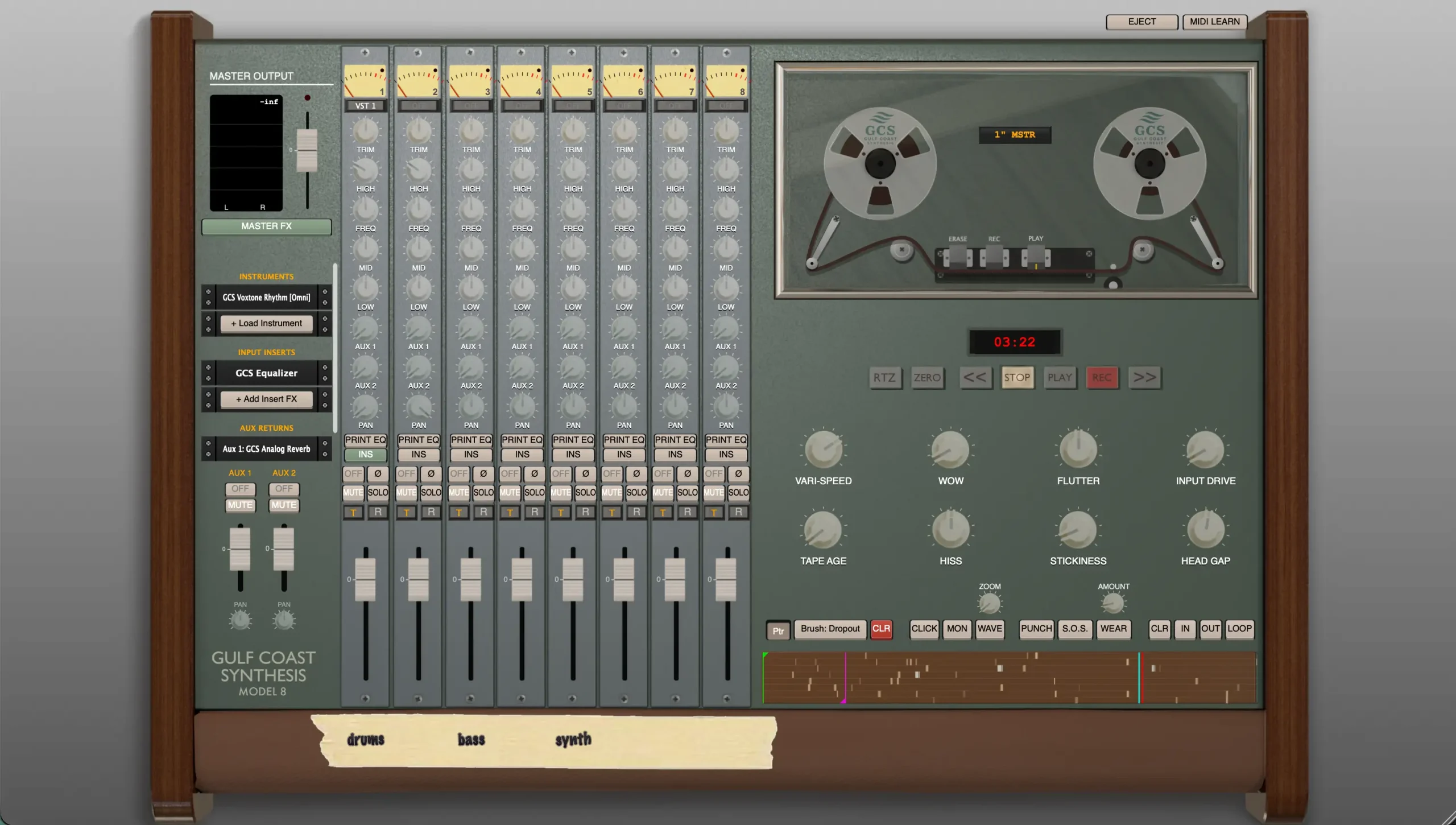
Most DAWs on iPad position tape emulation as a post-processing step — add a plugin to a track, dial in some saturation and flutter, call it analog. GCS Model 8 by Gulf Coast Synthesis takes the opposite approach. Tape is not an effect you add at the end of a session. It is the session. Developer Will Patterson has built a full standalone multitrack recording environment around a custom physical tape mechanics simulation, where every track records to a virtual reel driven by the same mathematical models that govern how oxide-coated tape actually behaves on a transport. The result is categorically different from any other audio production environment currently on iPad — which is both its greatest appeal and the reason it will not suit every workflow.
The physics engine is the technical centrepiece. Rather than applying static saturation curves or pre-recorded impulse responses, GCS Model 8 calculates tape transport behavior in real time: wow (slow rotational irregularities from motor variation), flutter (faster mechanical oscillation), stiction (stick-slip friction as tape passes the head), oxide age, and head gap characteristics. These properties change depending on which tape format you select — Cassette, 1/4″, 1/2″, or 1″ Master reel — with each format altering the dynamic frequency response, input drive threshold, and saturation curve across the signal chain. The interaction between these parameters is continuous rather than stepped, so dialing up input drive on a 1/4″ session produces a different harmonic result than the same drive level on a 1″ Master session, because the physical model for each format responds differently. Beyond the passive physics, the tape reels are interactive: scrubbing the reel visually changes playback speed with the corresponding pitch shift and wow, and grabbing the tension arm creates manual flutter that tracks the movement of your hand. This is not something you can achieve in a plugin slot inside Cubasis or Logic Pro for iPad.
The track count ceiling requires honest discussion, because the marketing figure of 24 tracks is accurate only on high-end hardware. GCS Model 8 runs its physics calculations entirely in RAM — there is no disk streaming. Every active track occupies physical device memory simultaneously. On standard iPads with 3 to 4GB of RAM (iPad 9th/10th gen, iPad mini 6th gen), the app’s built-in memory estimator typically limits you to around 8 tracks for a 10-minute tape session, or 16 tracks for a 5-minute session. The full 24 tracks at 10 to 15-minute tape lengths requires an iPad Pro or iPad Air with Apple Silicon and 8GB or more of RAM. This is not a workaround or a bug — it is the direct cost of running a real physics simulation rather than a statically-rendered approximation. Patterson documents this clearly in the App Store listing itself and includes the memory estimator so you cannot accidentally create a project your device cannot run. For producers with a base-model iPad, this is a significant constraint. For those on M-series hardware, it is the reason the physics can exist at all.
The integrated instrument and effects rack is extensive enough that GCS Model 8 functions as a complete production environment without any external plugins. The instrument side includes the A-10 Poly (analog polyphonic synth), A-1 MonoBass (dedicated bass voice), Glissandio (expressive ribbon-style synth modeled on a tannerin), and the Voxtone Rhythm Machine (vintage drum machine). The outboard section covers the main effects you would route hardware signal through: an LA-2A-style opto compressor, a FET-76 limiter, tape echo, spring reverb, parametric EQ, and a multi-modulation unit. All of these are component-modeled rather than sampled. Third-party AUv3 plugin hosting is also supported, so your existing iOS plugin library can insert directly into the tape channel strips. The workflow itself follows destructive recording conventions — zero-latency punch-ins, Sound-On-Sound overdubbing for tape loop accumulation, internal track bouncing, and VCA grouping with fader automation. For producers who primarily work in a non-destructive, infinitely-undoable digital environment, this requires a shift in thinking. For those who came up recording to tape or who find the commitment of destructive recording more creative than limiting, it is the point.
The iOS App Store version is iPad only — no iPhone version of the main app. There is a companion iPhone Remote in TestFlight beta, but this is a Bluetooth/MIDI controller for the desktop version rather than a standalone recorder in its own right. The desktop application (macOS 10.13+ and Windows 10/11) is a separate purchase at $59.99 introductory price (regular $69.99) directly from Gulf Coast Synthesis’s website, not through the App Store. Files transfer seamlessly between the iPad and desktop versions, which is useful if you start sessions on the iPad and want to continue on a more capable machine. On the App Store, the download is free — you can record, mix, and fully explore the physics engine without paying anything. Saving projects, exporting audio, and accessing session snapshots requires the $14.99 one-time “Model 8 Pro” in-app purchase. Patterson explicitly recommends testing your specific iPad’s RAM limits before unlocking, and the free mode gives you enough access to verify the app runs as expected on your hardware before committing. At a 144MB install size and iPadOS 12.0 minimum (with optimal performance on iPadOS 15+), the technical requirements are straightforward aside from the RAM constraint.
Key features:
- Real-Time Magnetic Tape Physics: Custom mathematical engine models wow, flutter, stiction (stick-slip friction), oxide age, and head gap — recalculated live, not pre-rendered or sampled
- Four Tape Formats: Cassette, 1/4″, 1/2″, and 1″ Master reel, each with distinct dynamic response, drive threshold, and saturation curve
- Interactive Tape Transport: Scrub reels and grab the tension arm in real time for live pitch and flutter performance
- Up to 24 Audio Tracks: RAM-dependent — standard iPads (3-4GB) typically support 8-16 tracks; iPad Pro / Air M-series (8GB+) required for full 24 tracks
- Tape Defect Paintbrushes: Draw physical wear directly onto the tape timeline — crinkle, flutter, drag, and dropout parameters applied to specific regions
- Destructive Recording Workflow: Zero-latency punch-in, Sound-On-Sound overdubbing, internal track bouncing, and VCA grouping with fader automation
- Integrated Synthesizers: A-10 Poly Synth, A-1 MonoBass, Glissandio ribbon synth, and Voxtone Rhythm Machine — all routable directly into the tape session
- Analog Outboard Rack: Component-modeled LA-2A opto compressor, FET-76 limiter, tape echo, spring reverb, parametric EQ, and multi-modulation
- Third-Party AUv3 Plugin Hosting: Load external iOS effect and instrument plugins directly into the channel strip
- Desktop File Transfer: Projects sync between iPad and the separate macOS / Windows desktop app ($59.99 intro, from gulfcoastsynthesis.com)
- iPad only on iOS. Free download — $14.99 one-time IAP unlocks project saving, export, and snapshots. iPadOS 12.0 minimum (15.0+ recommended). 144 MB.
App price: Free.
In-app purchases: Model 8 Pro — $14.99 (project saving, audio export, session snapshots).
Original release: June 12, 2026 (v3.0 commercial release) | Latest update: June 12, 2026


Leave a Reply