
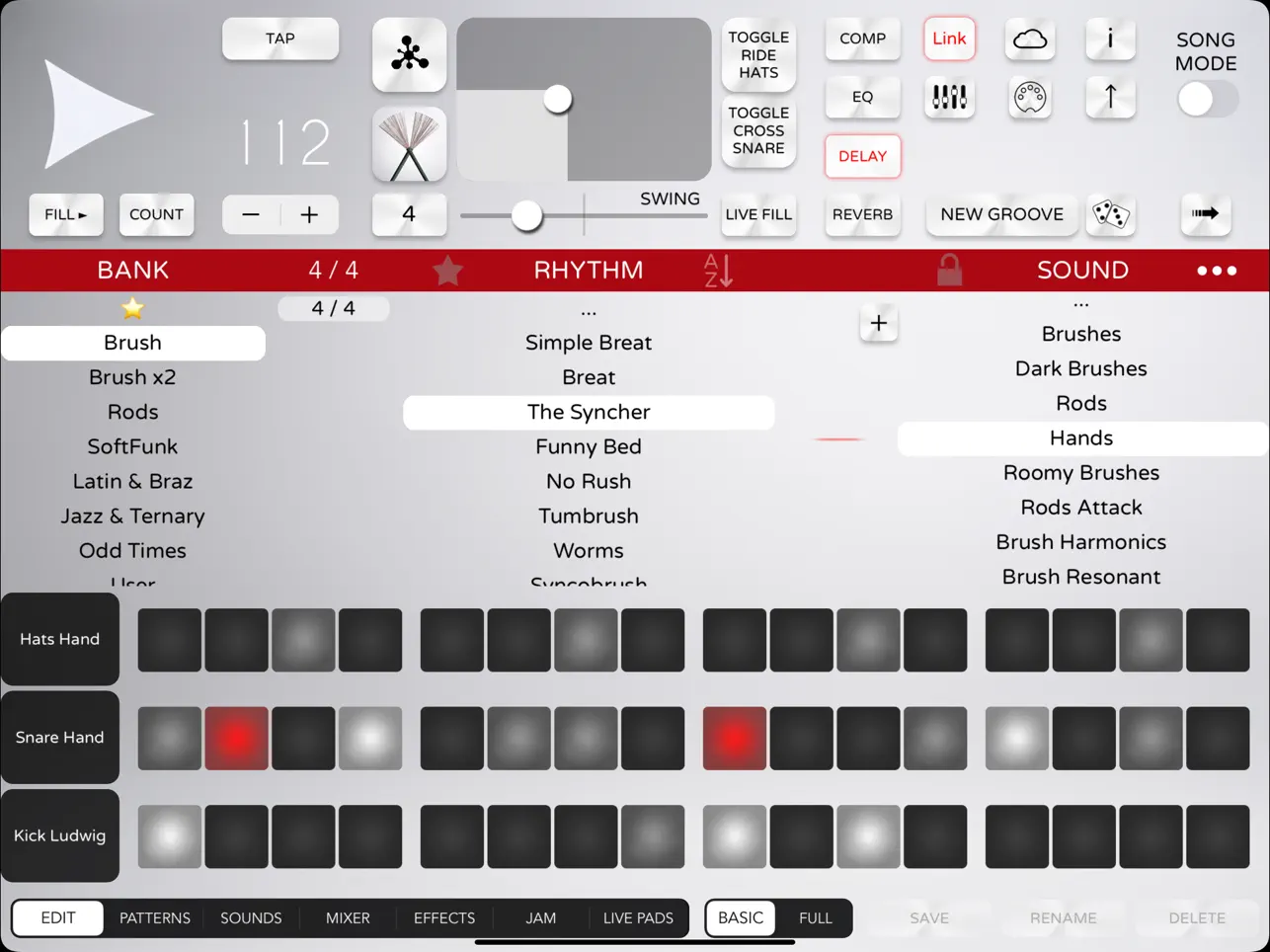
An extensive architecture update is now live for Luis Martinez’s (Lumbeat) Soft Drummer, bringing the acoustic percussion app into alignment with modern mobile production standards. The headline addition to this release is native AUv3 instrument support, resolving long-standing integration hurdles tied to deprecated Apple audio protocols. Alongside this structural overhaul, the app has transitioned from a paid upfront application to a free-to-download model with optional expansion tiers.
The Headline: Native AUv3 Plugin Support
For several versions, Soft Drummer relied on Inter-App Audio (IAA) and Audiobus for cross-app routing. Because Apple has deprecated IAA, incorporating the app’s acoustic engine into contemporary mobile workflows previously required unstable workarounds and lacked automated project recall.
With this update, Soft Drummer operates natively as an AUv3 Instrument plugin. It can be loaded directly inside host environments such as Loopy Pro, AUM, Cubasis, Logic Pro for iPad, and GarageBand.
This transition provides three critical workflow improvements:
- Multi-Instance Performance: Users can now open multiple distinct instances of Soft Drummer on separate tracks within the same project host, running different kits or time signatures simultaneously.
- Session State Saving: All pattern selections, internal mixer settings, tempo alterations, and kit configurations are saved directly inside the host DAW project file, removing the need to manually save and reload presets within the standalone app.
- Advanced Multi-Out Routing: Individual kit pieces can be separated and assigned to discrete channels inside compatible host mixers for isolated equalization, compression, and external processing.
Interface, Sync, and Arranging Enhancements
Beyond the plugin framework, this update introduces several feature additions and layout changes to optimize both standalone and hosted environments:
iPhone Vertical Layout
The application interface has been redesigned to support a vertical screen orientation tailored specifically for iPhone. This update enhances one-handed operation and navigation on smaller mobile displays compared to the legacy landscape-locked UI.
Cross-App Ecosystem Sync
Soft Drummer now includes automated internal synchronization hooks designed to bridge its arrangement timeline with Lumbeat’s companion software, specifically iBassist and Pop Drummer. When active, the connected applications align their arrangement blocks, tempo alterations, and song playback controls.
Arrangement & Mixing Adjustments
- Song Mode: A structured arrangement timeline allowing users to sequence intro blocks, fills, main verses, and explicit endings into a complete backing track.
- Individual Reverb Sends: The global reverb layer has been updated with independent send attenuators for specific kit pieces, allowing drier kick and snare processing while maintaining spatial depth on cymbals or percussion.
- Export Effects Toggle: When rendering audio stems, users can choose to bake the internal channel EQ and effects processing directly into the exported WAV files or output dry raw signals for external studio mixing.
Business Model Transition
Soft Drummer has moved away from its legacy fixed premium price point. The core app is now free to download, allowing users to test the base sample kits and core AUv3 functionality without upfront costs. Access to specialized historical rhythm libraries, complex time signature expansions, and secondary acoustic drum kits are handled via optional, tiered in-app purchases.
Lumbeat’s Soft Drummer just gained AUv3 support, which changes how it fits into a mobile production rig. The app has always focused on acoustic, low-to-mid volume drumming — brushes, hot rods, jazz sticks — rather than the electronic kits that dominate most iOS drum apps. What sets it apart from loop-based alternatives is an improvisation algorithm: the drummer shifts patterns, adds fills, and varies intensity throughout a session rather than repeating a single bar. The result is more useful for folk, jazz, pop, and indie-rock than anything that relies on static loops.
With AUv3 you can now load Soft Drummer directly in AUM alongside other instruments and effects, replacing the older Inter-App Audio workflow. Multiple instances run simultaneously if you need different kit sounds on different tracks. The 8 assignable performance pads trigger fills, intros, endings, and transitions via touch or MIDI CC, and the Song Mode builds out a full rhythmic framework quickly. For producers using Lumbeat’s iBassist alongside Soft Drummer, both now run inside the same AUv3 host session — the rhythm section comes together on one screen. Ableton Link keeps everything in sync across apps and devices. Running it inside Loopy Pro works particularly well for loop-based recording sessions where you want the drummer to react in real time as layers build.
The mixer includes 2D sliders for Jam Intensity control, plus compressor/gate, EQ, delay, and reverb. Export options cover full stereo mix, multi-track stems, and MIDI — the MIDI export is useful if you want to drive another synth with Soft Drummer’s groove patterns rather than its own audio. Over 50 multilayered sounds per kit with three hit types (ghost notes, accents, drags/open hits) and round-robin sample selection keep repeated hits from sounding identical. The base app is a single buy with optional IAP soundsets for specific kit characters.
Key features:
- AUv3 Support: Load multiple instances inside AUM, Logic Pro for iPad, Loopy Pro, Cubasis, and other hosts
- Improvisation Algorithm: Patterns shift, fills vary, and intensity adjusts dynamically — not a repeating one-bar loop
- Acoustic Realism: 50+ multilayered sounds per kit, three hit types, round-robin sample selection
- Live Performance Pads: 8 assignable pads for fills, intros, endings, and transitions — touch or MIDI CC
- Song Mode: Build a complete rhythmic track structure quickly
- Deep Customization: Mixer with 2D Jam Intensity sliders, compressor/gate, EQ, delay, and reverb
- Pro Export: Stereo mix, multi-track stems, and MIDI file export
- Ableton Link and iBassist integration
App price: Free (varies by region)
In-app purchases: $22.99 – Full Access, $3.99 – $4.99 – Additional Options


